Riot games have created a new My Valorant Badge page, where you can create a badge to show off your stats. This will be personalized and you get to show off things like your agent win rate, your headshot percentage, and more. And the best part is you can make one very easily. So check out how to create your own personalized Valorant Badge.
How to Create your Own Badge in Valorant
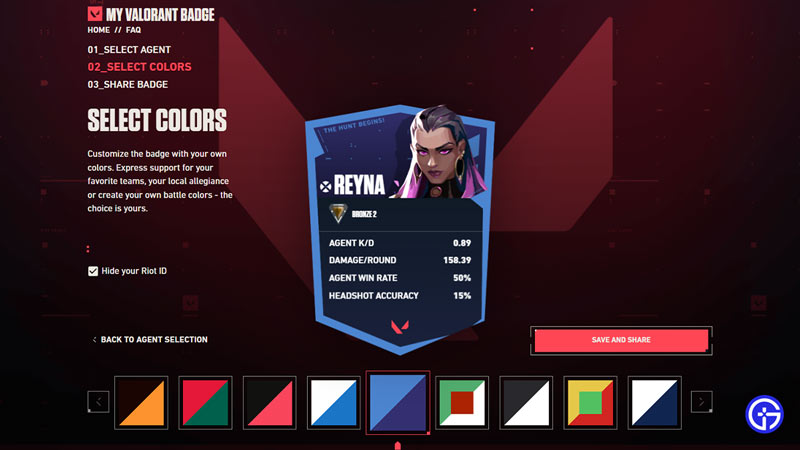
You can create your My Valorant Badge with most agents of your choice on the game’s official badge site. This is a page developed by Riot Games to let the community engage better by letting them show off their stats. Here is what you need to do to make one:
- Go to the My Valorant Badge webpage.
- Next, click on the Sign in button on the top right corner of the screen.
- Sign in using your Username and Password. Or you can directly login using Google, Facebook, or your Apple ID.
- Here, click on the red “Create Your Badge” button.
- The site shows you your Riot ID and asks you if you are OK to create your badge with it. Click Continue.
- Wait for the page to load your stats for the different agents.
- Now, select the Agent that you want to make your Badge for.
- You can also check the Hide your Riot ID option if you don’t want others to see your Riot ID.
- Once selected, click “Select and Continue”.
- Now, choose the colors for your Badge.
- Finally, click on the “Save and Share” button.
- The site will show a popup of Generating Badge please wait.
- Once the badge is ready you can share the link to your Badge on various social media like Facebook, Twitter, Instagram, Discord, and more. Alternatively, You can also copy the link to your badge.
On your badge you can see the following stats:
- Rank
- Agent K/D
- Damage/Round
- Agent Win Rate
- Headshot Accuracy
The best part of this website is you can create a new badge as many times as you like. Do remember, if you have never played Valorant before then you will need to create your account on it first. And you also need to have played a few competitive matches and have your rank unlocked for it to show your rank.
That covers this guide on how to make your own Valorant Badge. Since you like playing this game don’t forget to check our other Valorant guides.