Home > Gaming Guides > How To Create A Ballplayer In MLB The Show 23

How To Create A Ballplayer In MLB The Show 23

Updated Date :

It’s that time of the year again, and baseball is back in fashion. MLB The Show 23 is the newest addition to the long-running sports game series, and it might just be the best one yet. Players are in for a treat thanks to updated graphics, new game modes, and a stacked roster of the game’s past and present legends. But the best part of the series has always been its career mode, where you get to play out your dream of making it to the big leagues. You can create your own Ballplayer in MLB The Show 23.

How to Make a Ballplayer in MLB The Show 23
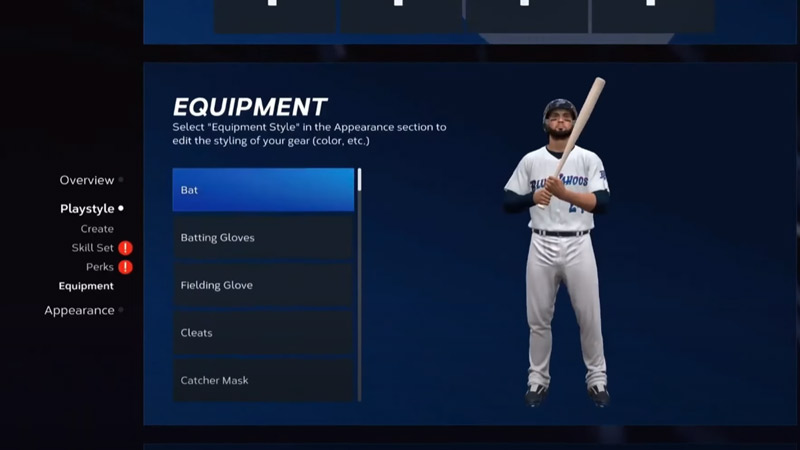
how to create a ballplayer in MLB the show 23

The Road to The Show mode lets players make their own Ballplayer who can play and compete in the MLB. It starts the process by selecting the Road to The Show option in the main menu or go to your profile icon. The first thing you need to do is choose what kind of player you will be. You can choose one of the three options- Position Player, Pitcher, and Two-Way Player. You can either choose to excel as either a Pitcher or a Hitter. Choosing the Two-way Player option will allow you to play as both. This choice, thankfully, is not permanent but will take some work to reverse. Also, check out our guide on changing positions if you feel better suited for something else.

After selecting your position and setting up your playstyle, you can set your appearance. You can use the pre-made options to make a Ballplayer look precisely like you picture them. A new addition to the series is the ability to scan your face and add it to the game. After you’ve done all you need to, click on Start your Career to complete the process. You can have up to 5 different Ballplayers in your profile. Now all that’s left is to pick the team you want to get drafted to and begin your journey to the Baseball Hall of Fame.

That’s all we have on how to make a Ballplayer in MLB The Show 23. For more on the game, check out our MLB The Show 23 Guides here on Gamer Tweak.

  • Crunch My Butter Codes (August 2026)

    Crunch My Butter Codes (August 2026)

    Published Date :

    Looking for the latest Crunch My Butter codes? This satisfying Roblox simulator lets you crunch different types of butter, earn cash, unlock better butter, and keep your buttery empire growing. While the game continues to receive updates, many players are also hoping for redeemable codes that offer free Cash or other rewards. Here’s the complete… Read More

  • Trench Decay Codes (August 2026)

    Trench Decay Codes (August 2026)

    Published Date :

    Trench Decay is a WW1 squad PvE shooter, and like most games like this, you can redeem codes to unlock cosmetic crates, medals and more. If you don’t wish to miss out, claim the freebies right away. Trench Decay Codes (August 2026) Expired Codes How to Redeem Trench Decay Codes These are the steps you… Read More

  • Capybaras VS Plants Codes (August 2026)

    Capybaras VS Plants Codes (August 2026)

    Published Date :

    Lots of Cash per second, better eggs and Capybaras are what will make you rich in Capybaras VS Plants, and to get a boost during your grind, you need to redeem these new codes. These goodies are regularly dropped by the developers, and with them, you can unlock Hatch Hammers, Totems, exclusive Eggs, and more!… Read More

  • Heal your Injuries Codes (August 2026)

    Heal your Injuries Codes (August 2026)

    Published Date :

    Heal your Injuries is a JJK-inspired game, where you need math to heal yourself as you get hit by bombs, weapons and more. While playing, you will need EXP and Energy to progress, and thankfully, Heal your Injuries codes drop exactly that! Here’s a complete guide with all the latest rewards and how to claim… Read More