Close Menu
    Facebook X (Twitter) Instagram
    Gamer TweakGamer Tweak
    • GT Originals
    • Guides
      • AC Mirage
      • Starfield
      • Wordle
      • Mobile
      • GTA 6
      • AC Valhalla
      • Genshin Impact
      • Honkai Star Rail
      • Minecraft
      • Discord
      • Street Fighter 6
      • Project Slayers
      • The Sims 4
      • Lies of P
      • Zelda TOTK
    • Roblox
      • Roblox Codes
      • Blox Fruits
      • Type Soul
      • Grow a Garden
      • 99 Nights in the Forest
    • Review
    • Roblox Codes
    • BG3
    • CS2
    Gamer TweakGamer Tweak
    Home > Minecraft > Craft Glow Item Frames in Minecraft
    Minecraft

    How To Craft Glow Item Frames In Minecraft

    Shaili ChhedaBy Shaili ChhedaJune 11, 20212 Mins Read

    Minecraft 1.17 update has introduced us to glow item frames. You can basically use them as home decor. You can place items in your glowing frame. If you want to get one and do not know how to get it, keep reading this guide for a glowing frame item crafting recepie.

    Glow Item Frames Crafting Recipe in Minecraft

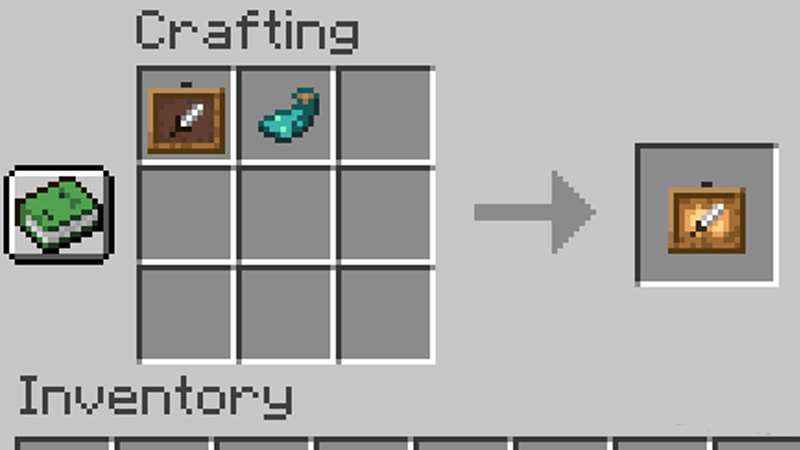
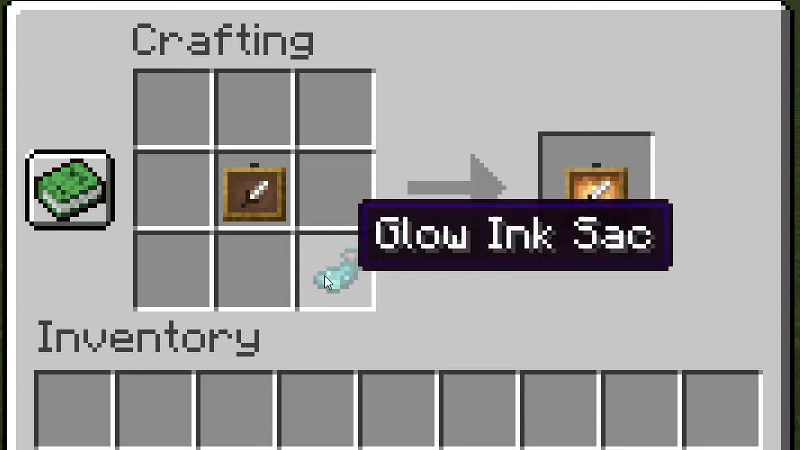
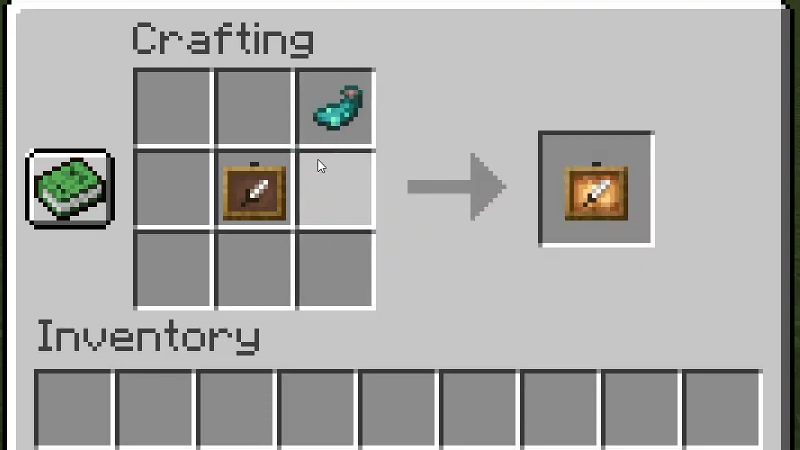
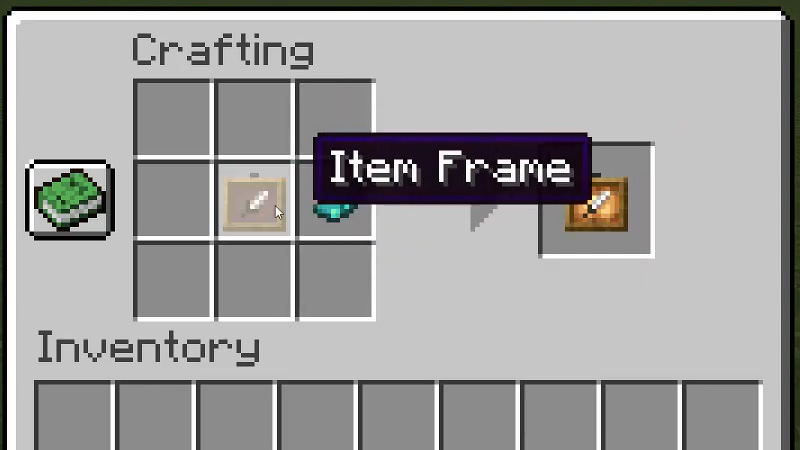
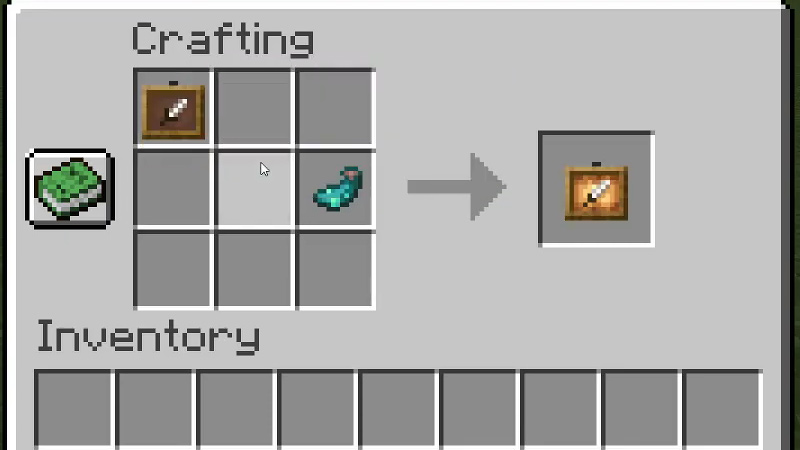
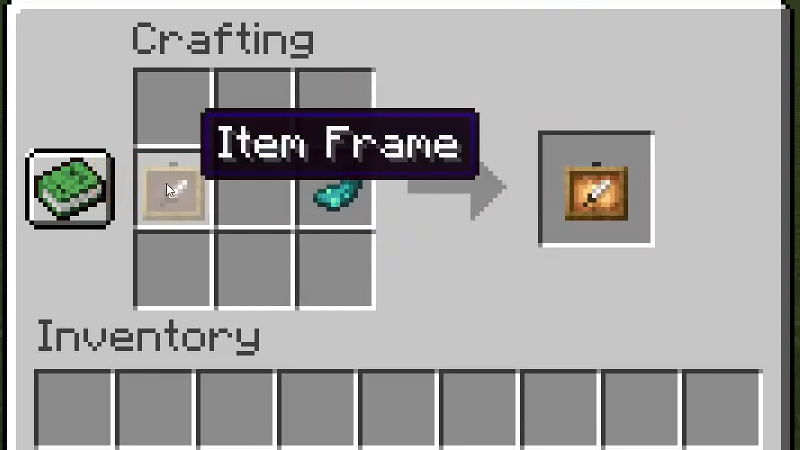
    To craft a glow item frame open the crafting menu that has the 3×3 crafting grid. Place 1 item frame and 1 glow ink sac in the crafting grid. The placement pattern can be any of these:

    Crafting Method 1
    Minecraft

    1. Top row first box: x1 Frame
    2. Top row middle box: x1 glow ink sac

    Crafting Method 2
    Crafting Method 1

    1. Middle row middle box: x1 Frame
    2. Bottom row last box: x1 glow ink sac

    Crafting Method 3
    Crafting Method 2

    1. Middle row middle box: x1 Frame
    2. Top row last box: x1 glow ink sac

    Crafting Method 4
    Crafting Method Minecraft

    1. Middle row middle box: x1 Frame
    2. Middle row last box: x1 glow ink sac

    Crafting Method 5
    Minecraft Crafting

    1. Top row first box: x1 Frame
    2. Middle row last box: x1 glow ink sac

    Crafting Method 6
    Glow Item Frame Minecraft Crafting

    1. Middle row first box: x1 Frame
    2. Middle row last box: x1 glow ink sac

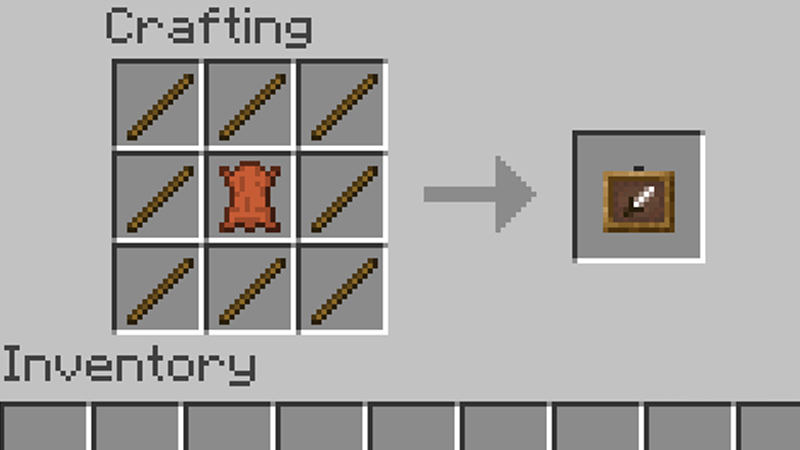
    Once the item is crafted, just move it to your inventory and now you have a glow item frame in Minecraft. You will get the glowing ink sac from Glow Squids. If in case you do not know how to make an item frame in Minecraft, here are ingredients that you need to make one:

    • x8 Sticks
    • x1 Leather

    Take the 3×3 crafting grid and place them in a way that the middle box of the grid is occupied by the leather and all the boxes surrounding it have sticks placed. It should look like the picture below:
    Frame Item Minecraft

    So that is all for our guide on how to craft glow item frames in Minecraft. If you would like to know how to get moss blocks in the game, we have an article on that too for you to check out.


    Minecraft Guides PC Tips and Tricks
    Share. Facebook Twitter Pinterest LinkedIn Tumblr Email Reddit
    Shaili Chheda

    Hi nice to meet you, I live in an RPG simulation just like you.

    Related Posts

    How In-Game Skins Shape and Strengthen a Player’s Personal Brand

    November 27, 2025

    Unwritten Helldivers 2 Rules – Don’t Make These Mistakes!

    November 20, 2025

    Where Winds Meet Codes (November 2025)

    November 19, 2025

    User Experience in Quick Online Games – How to Retain Players

    November 11, 2025
    Latest Codes

    The Forge Codes Roblox (December 2025)

    December 1, 2025

    Inazuma Strikers Codes (November 2025)

    November 26, 2025

    Deadly Delivery Codes (November 2025)

    November 26, 2025

    Roblox Hypershot Codes (November 2025)

    November 26, 2025

    SLAP Codes Roblox (November 2025)

    November 25, 2025

    Catch a Monster Codes (November 2025)

    November 25, 2025
    Trending
    • Cuprite in The Forge: How To Get and Farm It
    • How to Find Bard’s Missing Guitar in The Forge
    • How to Change Race in The Forge
    • The Forge Codes Roblox (December 2025)
    © 2025 Gamertweak.
    • Advertise With Us
    • About Us
    • Team
    • Contact Us
    • Privacy Policy
    • Terms
    • Open Critic

    Type above and press Enter to search. Press Esc to cancel.