
While some players like to use a mouse and keyboard for FPS games like Battlebit Remastered, others prefer if it has controller support. The game may look simple with Roblox-esque graphics but its features are no less than modern AAA games. It has 45+ weapons, each with multiple attachments. You get to choose from different classes like Assault, Medic, Support, and more. If controllers are your preferred choice for FPS games, then check out whether this game supports them or not.
Can You Play Battlebit Remastered on a Controller?
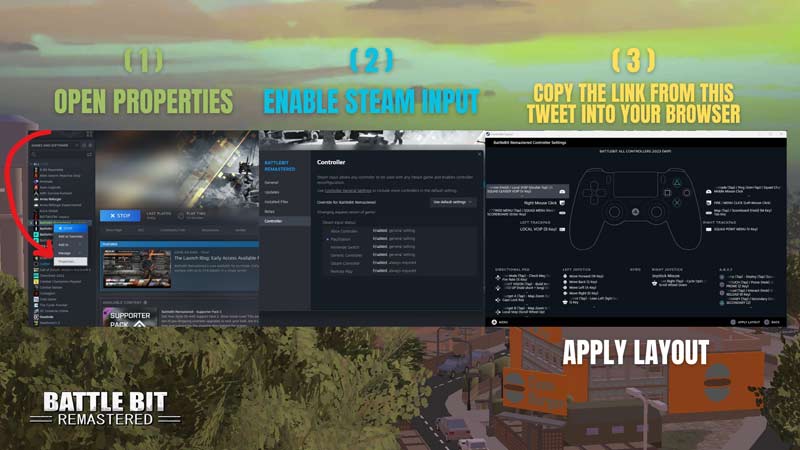
Yes, you can play Battlebit Remastered on a controller. To use a controller,
- Connect the controller to the PC.
- Launch Steam and go to Settings.
- Now, click on Controller and select General Controller Settings.
- From there, enable the controller support according to the one you have (PS/Xbox/Steam).
- Now, go to the Steam Library and right-click on Battlebit Remastered.
- Select Properties and go to the Controller tab.
- Click on Controller General Settings.
- Copy the link – steam://controllerconfig/671860/2989910468
- Paste the link in the browser.
These are the official controller settings by Battlebit Remastered. You can use the layout as it is or edit it according to your preference. Steam also allows players to create their controller bindings and upload them. To select them, simply hit Shift + Tab on Steam to open the Overlay page. Click on the Controller Configuration option on the top-right corner of the screen. Now, click on Browse Configs and select Community. From here, you can select any binding setting that you like.
steam://controllerconfig/671860/2989910468
1) Open Properties
2) Enable Steam Input (usually enabled)
3) Copy/Paste this link to your browser, enjoy. pic.twitter.com/ASusgBHBkG— BATTLEBIT 🚀 JUNE 15TH ON STEAM (@BattleBitGame) June 16, 2023
Alternatively, if you want to change your controller settings ingame, then simply open your main menu. Then, go to the option called Keybindings. From there, you can assign an action to your controller.
We hope this answered your question about whether Battlebit Remastered has Controller Support. You can also check out Battlebit Remastered codes for freebies on Gamertweak.










