Diablo Immortal is out on Android and iOS and it is gaining attention from players old and new. The free-to-play game is adding more players to the Diablo fandom. The PvE part of the game requires a lot of grind to collect Legendary Items and gear, and increase your in-game attributes. These attributes reflect your abilities when you take on PvP matches, complete Elder Rift, or Challenge Rift. Combat Rating is one such attribute so check out this guide on how to check and increase Combat Rating in Diablo Immortal.
How to Check & Increase Combat Rating in Diablo Immortal
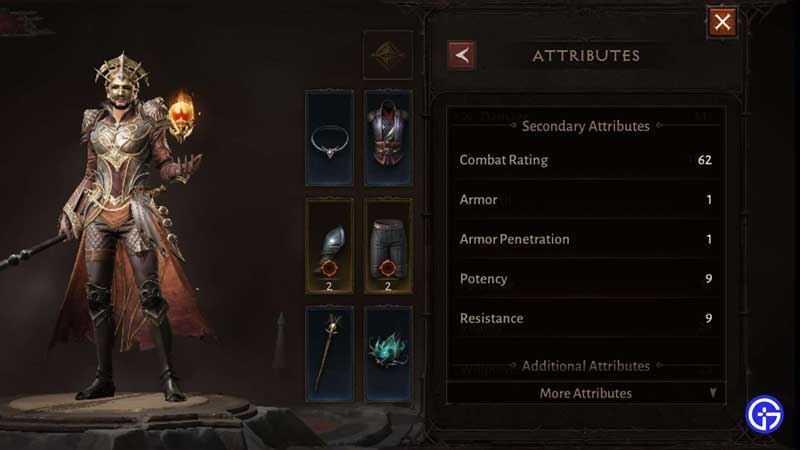
Mobile users, if you are wondering how you can check your Combat Rating then here’s how you can do it –
- Tap the character icon on the top-left corner of your screen.
- The drop-down will show three options.
- Select the left option, it looks like a paper. This opens your profile.
- Now select Attributes, and look for More Attributes below.
- You will be able to check your Combat Rating.
PC users, if you want to check your Combat Rating, here’s how you can do it –
- Click the icon on the top-right corner, below the options menu. The icon is the one you use to access your Stash.
- On the bottom-left side, click on the icon that looks like a character. It’s above the Equipment tab.
- Click on More Attributes once the window pops up.
- You will be able to check your Combat Rating.
How to Increase Combat Rating
Increasing Combat Rating often goes hand in hand with your grind. So there is no extra hassle that you will have to go to do it. Here are a few things that you can do –
- Upgrade your gear as much as possible. Try keeping the upgrades in all parts of the gear even.
- Keep acquiring better gear from Dungeons, Challenge Rift, and Elder Rift.
- Farm for Legendary Gems by going into Dungeons, Challenge Rift, and Elder Rift.
That’s all you need from this guide, so head on and check your Combat Rating and make sure to increase it in Diablo Immortal. While you are here, make sure you check out our guides, tips, and tricks on Diablo Immortal right here on Gamer Tweak.