
Minecraft is an amazing Sandbox game that brings the 2D Pixels aesthetic to a 3D game. You can play in Singleplayer and create magnificent builds like Monuments, various Realms, Redstone Machines, etc. To construct structures like these, you will need Materials. Some materials are straightforward like Stone & Wood where you can get them by Breaking their Blocks. Lava on the other hand is not as simple. Lava is a liquid hazard that has pretty useful properties. As such it is used in many mechanical structures and even aesthetic ones. In this guide, I will show you how to Collect Lava in Minecraft.
How to Collect Lava in Minecraft
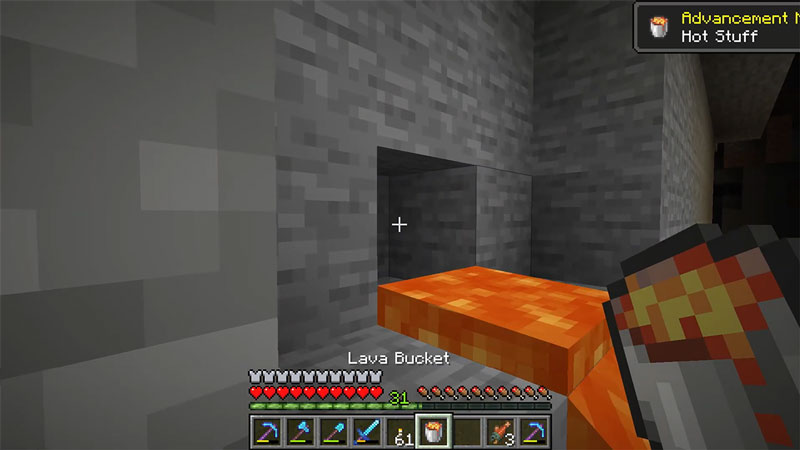
Lava is a Liquid Entity in Minecraft and is one useful Item to have on you. It behaves similarly to Water in the game and hence can be collected as such. To collect Water, we make a Bucket out of 3 Iron Ingots and then interact with it. The lava collection is more or less the same. Make an Iron Bucket and then head to your nearest Lava Source. You can find Lava on the surface in the form of Pools or Lavafalls. You can also find Lava Underground in Ravines or Cave systems. It is also found in Structures like Villages & Strongholds. The Nether is the best place to find Lava as it is practically an infinite Item there.
Once you have found a Lava Source, go to the Source Block and right-click with the Bucket in hand. You cannot collect a Flowing Lava Block, only the Source Block. It will make it into a Bucket of Lava. This is how you can collect Lava in Minecraft. Now you can take it and make a Single Lava Source Block anywhere you want. The smartest thing to do with that Lava Bucket is to make a Lava Farm. In Minecraft 1.17, it is now possible to infinitely Farm Lava. So get your Lava Bucket and place it on top of a Block. Now place a Dripstone on the underside of that Block and then a Cauldron under the Dripstone. Now you have a Lava Farm. You can upscale it to generate how much Lava you need.
This was all about how to Collect Lava in Minecraft. Hopefully, this guide has helped you. You can also check out our other guides like How To Get String in Minecraft.











