While playing Splitgate, you may have noticed that you cannot change the weapons you want. In this article, we will show you how to switch weapons easily.
How To Change Weapons In Splitgate?
Check out how you can change weapons in Splitgate with the steps below:
- If you play Splitgate, you may have noticed that you are unable to change to a weapon of your choice during a split arena fight.
- When you begin a game in this mode, you will only be given the Assault Rifle and Carbine guns.
- You might not want to continue with these guns throughout the game.
- Since Splitgate has a plethora of powerful weapons, you may want to try them out during the gameplay.
- Unfortunately, however, you will not have the option to toggle through weapons of your choice, unlike many other games.
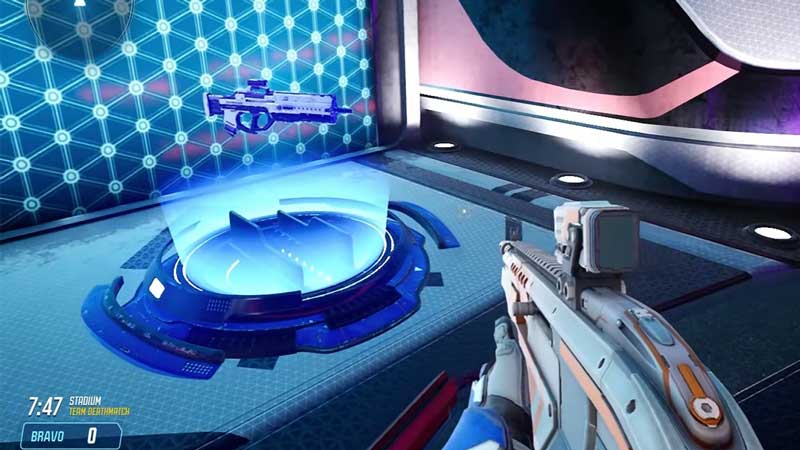
- The one way you can change weapons during the game is by looking for weapons that spawn during a split arena fight.
- When playing a game, you will need to run around the arena and look for weapons.
- The game will constantly spawn weapons at random spots in the match environment.
- You can easily spot these weapons as they will be highlighted with a glow. They will also be floating.
- To pick up these weapon spawns, you will have to walk up to the weapon and pick it up.
- If the weapon that has appeared in spawn is similar to the one you already have, walking to it will give you ammo reload.
- If you want to avoid having to scan the arena in Splitgate looking for weapon respawns, you can create your own custom game. In such a game, you can choose the weapon of your choice to start with.
- The only downside of doing this is the probability that you may not be able to attract a lot of players to your game.
This is how you can change weapons in Splitgate. As you can see, while the game does not offer you the opportunity to toggle between weapons during matches, it does allow you to pick up spawn weapons.
If you liked this article, check out all you need to know about the Matchmaking Not Working error in Splitgate.