Hogwarts Legacy comes with a plethora of customization options, where you can create a character according to your preference. It not only allows you to change its appearance but also the voice your character talks. The main motive of such in-detailed customizations option is to simply help you indulge in the wizarding world lore. However, there are times when you don’t like the changes you made and wonder if you can change them back. Just like this many Potterheads are trying to figure out how they can change their character’s voice in Hogwarts Legacy.
How to Change Your Character’s Voice in Hogwarts Legacy?
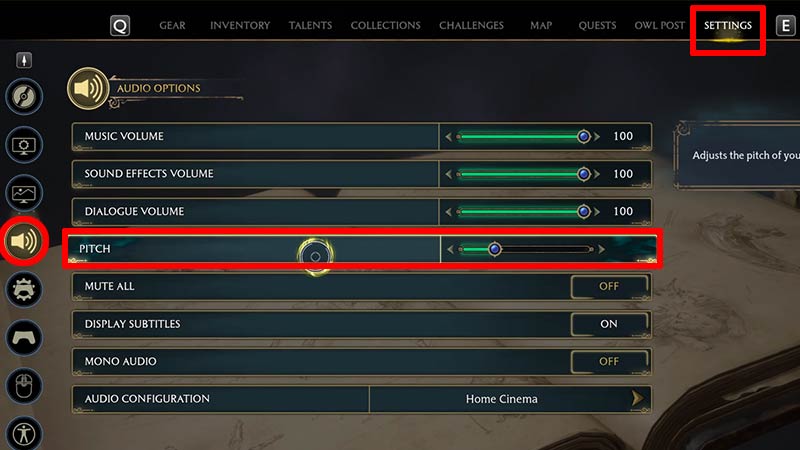
Unfortunately, you can’t change the tone of your character’s voice in Hogwarts Legacy. But you can always tweak the pitch of the voice. Doing so will surely make some noticeable changes to the way your characters talk in. If you are unaware of the steps to change the pitch then take a look at the steps mentioned below.
- First, launch the game and open the Menu.
- After that, select the Settings option (Gear icon)
- Next, go to the Audio option tab (Speaker icon)
- Then, go ahead and adjust the pitch according to your preference.
That’s how you can change your voice pitch in the game easily. As mentioned earlier, you can’t change the tone of the voice after finalizing the character creation at the very beginning of the game. But don’t worry, just like this option, there are various irreversible options players are not fond of. And there’s a possibility that the developers might fix these issues in the upcoming updates. However, till then it seems you are stuck with the tone in which your character speaks.
Also Read | How To Make Harry In Hogwarts Legacy Character Creator
That sums up all about how you can change your character voice in Hogwarts Legacy easily. While you are here take a look at how to make Voldemort’s Wand in the game. Also, check out other tips & tricks to survive in this wizarding world.