
You would like to know how to change road directions in Cities Skylines 2 if you want to reverse or change the one-way roads. As you control the traffic flow by changing the directions of one-way roads, it will help you create effective road networks. This can help you manage the connectivity and city’s transportation more efficiently. With better road connectivity, it can also help you out with managing the traffic. But unlike CS1, changing these directions works slightly differently in the sequel city-building game. So, check out our guide on how to change the road directions and the one-way roads.
How to Change the Cities Skylines 2 Road Directions
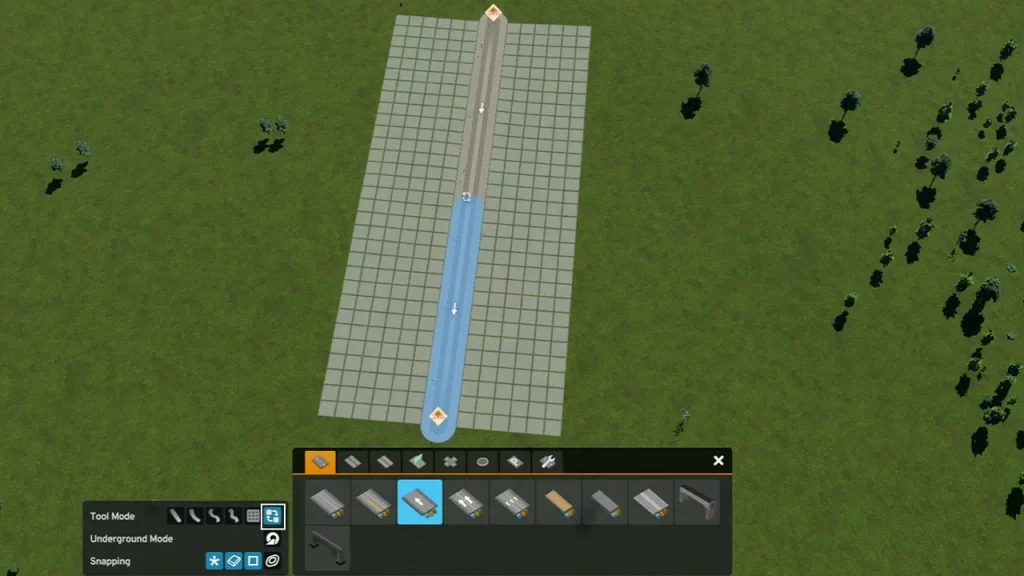
You can change one-way road directions in Cities Skylines 2 by selecting the same road you are using. Once you select the road, press the Replace button under Tool mode to override it. Then, select the road from the start to the endpoint to change the directions.
So, follow the below steps to reverse the road directions in CS2:
- Select the Replace button from the Tool mode to the right. This button’s icon is indicated by two blocks and two arrows.
- Then, select the existing one-way road and press the left mouse button.
- If the road is faced vertically, hold the LMB button and move your mouse in the opposite direction. For this, move the mouse up and down depending on the directions of the road.
- Similarly, if the road is faced horizontally, hold the LMB button to change the road direction in Cities Skylines 2. For that, move your mouse left and right depending on the directions.
- Using the above steps, you can also reverse or change the directions, again.
Fortunately, you don’t have to spend any additional expenses for the above methods. However, you may need to spend 1 Development point to access the Advanced Road services. You can find this section in the Development tab under Progression Menu.
That’s all about how to change road directions in Cities Skylines 2. If you liked this guide, check out more Cities Skylines 2 guides in our dedicated section right here on Gamer Tweak.











