Street Fighter 6 features two control settings called Classic and Modern but does not tell you how to change it. In an intense fighting game like this, it’s crucial to know all the controls to perform all the combos. Veteran Street Fighter players may favor the classic settings since they were in the previous installments. However, you can easily learn the combos with Modern Controls if you’re new to the game. In any case, we will tell you how to change controls in SF6.
How to Change to Classic Controls in Street Fighter 6 Battle Hub
In Street Fighter 6 Battle Hub mode, your default settings will be set on Modern Controls. To change your controls to the Classic settings in this online battle mode:
- Open your Profile Menu by pressing the Square/X button on your controller.
- Then, navigate to the Character tab next to Matchmaking.
- Now select the “Details” option.
- Navigate to the Control Type option and change it to Classic.
- Then, press Triangle/Y to apply the change to all characters.
If you don’t do the final step, then all the other characters will still have Modern settings. You can check your settings in the match by looking above the health bar. You’ll notice either an M or C based on the settings you’re using.
How to Change Controls in SF6 World Tour
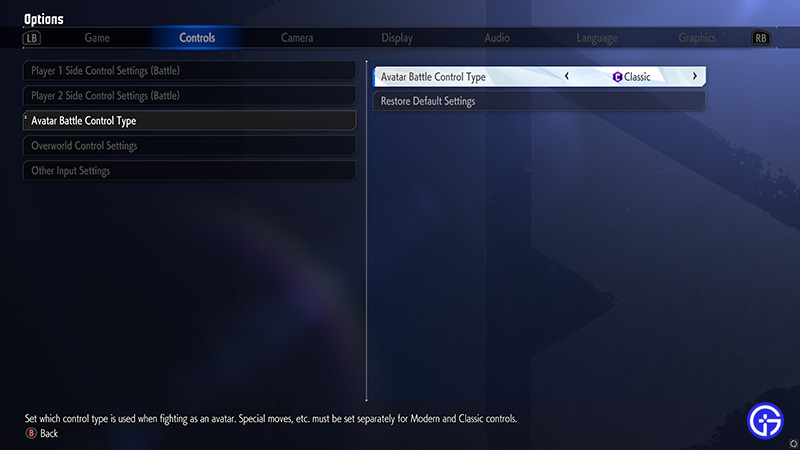
If you’re playing the World Tour mode, then the process of changing your controller settings is slightly different. To change the settings, you must complete the first chapter with Modern Controls. Once you complete the chapter, open your Main Menu and go to the Options tab. Then, navigate to the Controls tab and select Avatar Battle Control Type. You can change the control settings to Classic or Modern here.
That’s all from us on how to change controls like Classic and Modern in Street Fighter 6. While you’re here, check out our SF6 tier list to select the best fighters in battles.