Home > Mobile > Indian Bike Driving 3D: How To Change Clothes

How To Change Clothes In Indian Bike Driving 3D

Published Date :

Indian Bike Driving 3D is a mobile game that has gained popularity over the years amongst the gamer base. In the game, you will be able to navigate your way through difficult roads and various stunt mechanics all of it while riding famous bikes and cars from around the world. With the thrill of riding, the game provides various in-game features for players including various sets of clothes, different houses, etc. In this guide, you will get to know how you can change clothes and customize your appearance in Indian Bike Driving 3D.

How to Change Clothes in Indian Bike Driving 3D
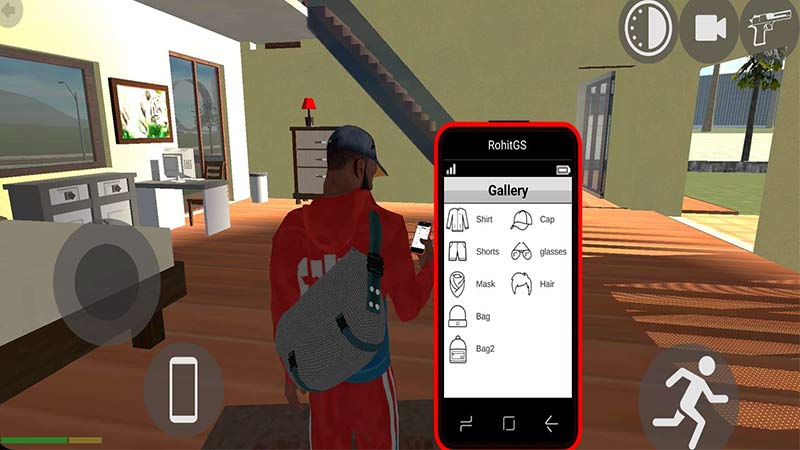
change clothes in indian bike driving 3d

To change clothes in Indian Bike Driving 3D, players can follow the steps given below one-by-one

  • Start by launching Indian Bike Driving 3D on your device.
  • After which you will have to access your character’s mobile in the game.
  • To do so, tap on the mobile option on your screen.
  • Here, you will be able to access various options in the settings along with Contacts, Messages, etc.
  • You will have to tap on the Gallery option in the interface, which is 3rd in the top row.
  • Once you do you will get various tabs for shirts, shorts, masks, glasses, etc.
  • You can tap on the option you want to change.

There are only limited options of clothes for every category in the game. Having said that there are many interesting options in shirts and shorts that you can use to customize your appearance in the game. You can tap on any category once to change the appearance while tapping on it again will revert it to default. The devs might add some more options in the future for you to customize your character even more.

That’s everything covered on how you can change clothes in Indian Bike Driving 3D. If you are looking for free bikes and cars as rewards in the game then you should check out our Indian Bike Driving 3D codes article, to get yourself some exciting rides.

  • Pop for Free Codes (August 2026)

    Pop for Free Codes (August 2026)

    Published Date :

    Pop for Free puts a simple twist on the obby formula. You complete obstacle courses based on their difficulty, earn Pops for finishing them, and then use those Pops to spin different colored wheels. Eventually you can claim free Robux so you have a good reason to keep pushing through more challenging courses. If you… Read More

  • Mine Rocks Codes (August 2026)

    Mine Rocks Codes (August 2026)

    Published Date :

    Mining in Mine Rocks is pretty straightforward: break rocks, collect Coins, turn them into Geodes, and use those Geodes to progress further. While you’re at it, a few boosts can make that process much quicker, especially when you’re just getting started. Here are all the Mine Rocks codes that are currently available. Last checked for… Read More

  • Anime Stars Codes (August 2026)

    Anime Stars Codes (August 2026)

    Updated Date :

    Anime Stars is all about collecting powerful anime Heroes and defeating enemies that prove to be increasingly difficult. You’ll need Coins, Gems, Summons, and other resources to keep upgrading, and codes can give you a nice head start with some of these resources. If you’re curious to know which rewards are working, here’s the full… Read More

  • Ghost Driver Codes (August 2026)

    Ghost Driver Codes (August 2026)

    Published Date :

    Ghost Driver puts you behind the wheel on busy highways where you’ll need to weave through traffic, build up your cash, improve your ride, and more to become one of the best drivers. A better car can make those early runs much easier, and the latest codes can give you a good amount of Cash… Read More