Close Menu
    Facebook X (Twitter) Instagram
    Gamer TweakGamer Tweak
    • GT Originals
    • Guides
      • AC Mirage
      • Starfield
      • Wordle
      • Mobile
      • GTA 6
      • AC Valhalla
      • Genshin Impact
      • Honkai Star Rail
      • Minecraft
      • Discord
      • Street Fighter 6
      • Project Slayers
      • The Sims 4
      • Lies of P
      • Zelda TOTK
    • Roblox
      • Roblox Codes
      • Blox Fruits
      • Type Soul
      • Grow a Garden
      • 99 Nights in the Forest
    • Review
    • Roblox Codes
    • BG3
    • CS2
    Gamer TweakGamer Tweak
    Home > Gaming Guides > How To Change Character Appearance In Back 4 Blood?
    Back 4 Blood

    How To Change Character Appearance In Back 4 Blood – Unlocking Skins For Cleaners

    DarwinBy DarwinOctober 14, 2021Updated:October 18, 20213 Mins Read

    Character customization and Skins in games are highly sought after by the Gaming Community. Skins are usually cosmetic and only make your Character look shiny. They can also be used as BM so be careful around toxic people. Skins are like Christmas gifts you get from under the Tree on Christmas Day. Like every game, Back 4 Blood has the feature of changing your Characters Appearance. In this guide, I will be explaining how to Change your Characters Appearance.

    How to Change Character Appearance in Back 4 Blood
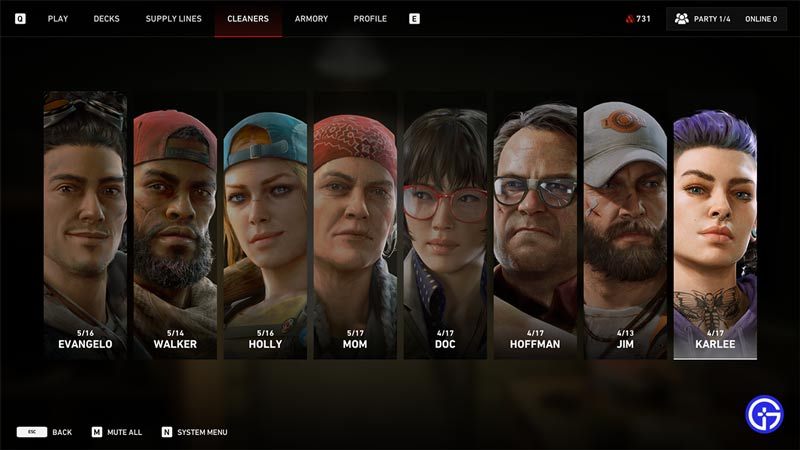
    cleaners tab in b4b

    Changing your Characters Appearance is pretty easy in Back 4 Blood. What you have to do is in Fort Hope, you will have to go to one of the spots that open up the Customizable Menu page. There will be Markers indicating the Interactable areas. Like, going up to the Campaign Tent will open it. Even the Bench to Edit Cards will open and so forth. In that menu, you will have to switch to the Cleaners Tab. You can also directly access it from the Cleaners tent in Fort Hope. In the Cleaners Tab, select the Cleaner you want to change the Appearance. You will be brought to a screen of the Cleaner and their Skin Collection. Select one of them and Equip it to change their Appearance. You can also mix and match the outfits to be more stylish.

    How to Unlock Skins in Back 4 Blood
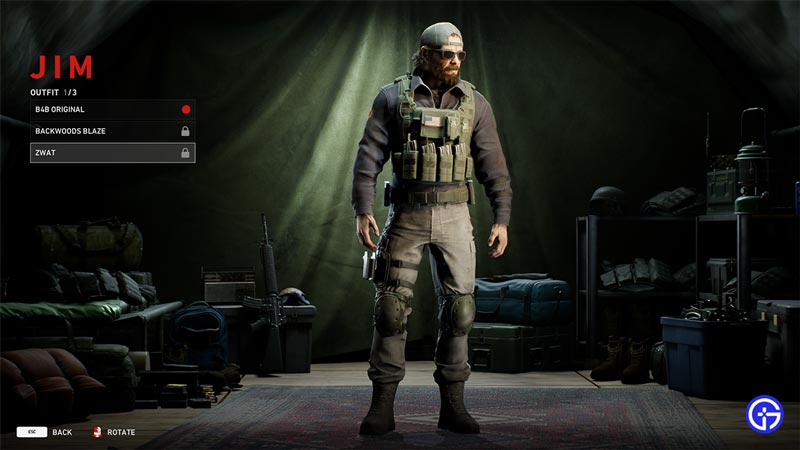
    skin select

    There are two ways you can get Skins in Back 4 Blood. One is to upgrade your Supply Lines and complete challenges in the Achievements. Supply Lines is a Tab next to the Cleaners Tab. Go to it and select one Supply Line and you will have to upgrade it with the Supply Points. You get Supply Points by playing Multiplayer Campaign Mode as of the time of this article. At the end of certain Supply Lines, you will be able to buy certain pieces of a Cleaners Skin Set. Also, Achievements allows you to unlock certain Skins to change your Cleaners Appearance. For example, completing all of the Campaign Maps with a Cleaner in Nightmare Mode will unlock the ZWAT Outfit of that Cleaner. You can do this with any Character and it will unlock the ZWAT Outfit for them.

    This was all about Changing the Characters Appearance in Back 4 Blood. Hopefully, this guide helped you in Customizing your Cleaner. You can also check our guides on the Voice Actors and Best Cards and Builds in Back 4 Blood.


    Back 4 Blood Guides PC PS4 PS5 Tips and Tricks Xbox One Xbox Series S Xbox Series X
    Share. Facebook Twitter Pinterest LinkedIn Tumblr Email Reddit
    Darwin
    • X (Twitter)

    Before you ask, yes my name is Darwin and no I am not Charles Darwin's cousin. But I do love everything Science, Games, and Anime. Think of me as your Baymax. Oh, I also like the Rubik's Cube.

    Related Posts

    Players Are Spending More Time in Virtual Worlds Than Ever Before, Showcasing the Largest Surge on Record

    December 3, 2025

    Unwritten Helldivers 2 Rules – Don’t Make These Mistakes!

    November 20, 2025

    Where Winds Meet Codes (December 2025)

    November 19, 2025

    User Experience in Quick Online Games – How to Retain Players

    November 11, 2025
    Latest Codes

    Anime Vanguards Codes (December 2025)

    December 4, 2025

    Last Letter Codes (December 2025)

    December 3, 2025

    The Forge Codes Roblox (December 2025)

    December 1, 2025

    Inazuma Strikers Codes (December 2025)

    November 26, 2025

    Deadly Delivery Codes (December 2025)

    November 26, 2025

    Roblox Hypershot Codes (December 2025)

    November 26, 2025
    Trending
    • Anime Vanguards Codes (December 2025)
    • How to Get Ruby in The Forge (Roblox)
    • Players Are Spending More Time in Virtual Worlds Than Ever Before, Showcasing the Largest Surge on Record
    • Last Letter Codes (December 2025)
    © 2025 Gamertweak.
    • Advertise With Us
    • About Us
    • Team
    • Contact Us
    • Privacy Policy
    • Terms
    • Open Critic

    Type above and press Enter to search. Press Esc to cancel.