Home > CS:GO > CS2 FPS Lock – How To Cap Or Uncap FPS

CS2 FPS Lock – How To Cap Or Uncap FPS

Updated Date :

Let’s take a look at how you can Cap or Uncap CS2 FPS so you can have a smooth experience while playing the different game modes. Since smooth gameplay and max FPS is what you would want out of your PC, many players want to uncap their FPS to get the best FPS available. However, if your PC starts acting out, you might see sudden drops in FPS which wouldn’t be so drastic if you have capped off your FPS level. While we prefer to lock our FPS, our guide here will help you on how to lock or unlock your Counter Strike 2 FPS.

How to Cap or Uncap your CS2 FPS
CS2 FPS Lock or Unlock

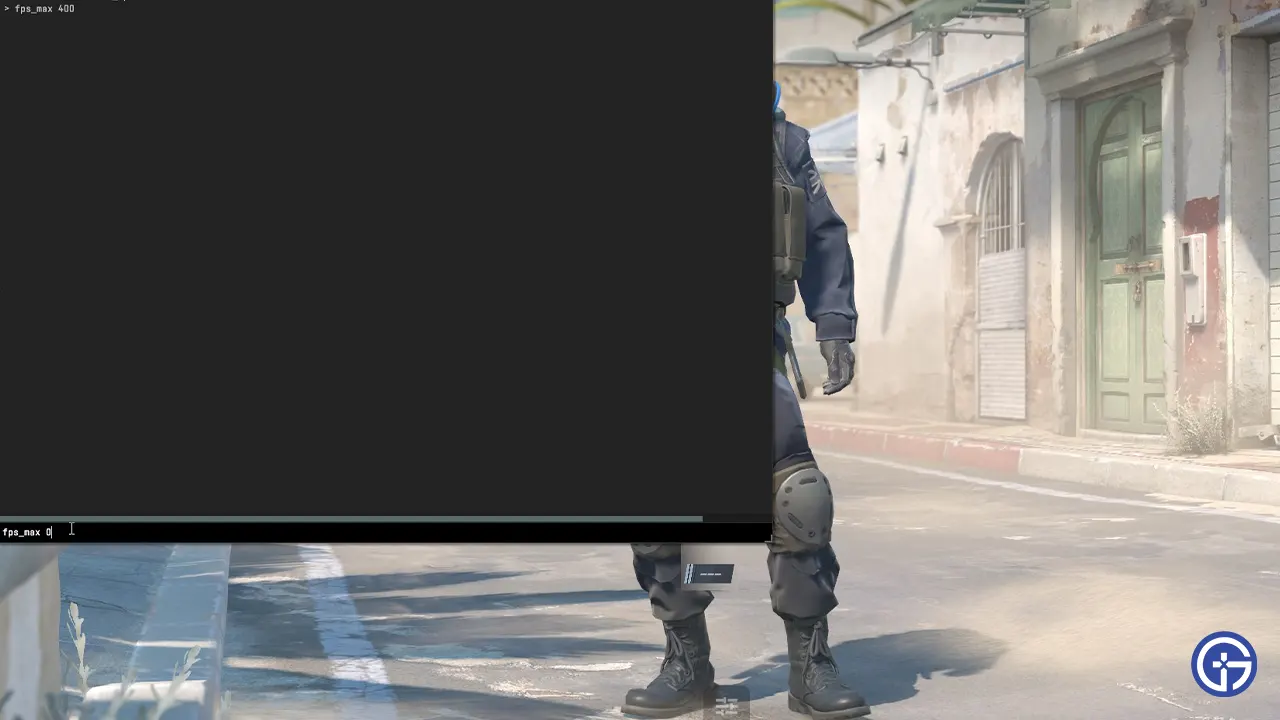
Console Commands are somewhat the heart of Counter Strike 2 and if you are looking to cap or uncap your CS2 FPS, the answer lies there. If you have just started Counter Strike 2, you will have to enable Developer Console first so you can use the commands we provide. So head over to Settings> Game and then scroll down till you find the Developer Console option. Now that you have enabled it, press ‘`’ key and then type in the following console commands to lock or unlock your Counter Strike 2 FPS:

  • fps_max 0 – This command will uncap your FPS to run at the best available Frame Rate. While this does provide a smooth experience, the FPS drops can be drastic and huge.
  • fps_max 30 – This command will cap your FPS to run at the mentioned Frame Rate.

If you want to cap your CS2 FPS at some other value, simply mention it next to fps_max and that should do it. Personally, the fps_max 400 cap is the best Counter Strike 2 FPS cap. However, this is something that you are free to experiment and try out based on your system. Additionally, make sure you have enabled the FPS Counter option for the game.

That’s all we have from this guide. Since you are playing Counter Strike 2, our dedicated section here has more guides that you might need. Do check them out while you are here at Gamer Tweak.

  • Level Your Weapon Codes (July 2026)

    Level Your Weapon Codes (July 2026)

    Published Date :

    Level your Weapon has quite an addictive gameplay – you start with a weak weapon, but you keep adding XP Crystals to it; the weapon gets stronger, helping you take down increasingly powerful enemies. Leveling up slowly is part of the fun; however, free rewards can make that grind a little smoother. If you’re looking… Read More

  • Mine a Planet Codes (July 2026)

    Mine a Planet Codes (July 2026)

    Published Date :

    Getting rich in Mine a Planet requires you to use laser drones to blast apart a giant voxel planet and evolve/upgrade as you go; however, codes can give you a significant boost while you’re at it! If you don’t want to look for the latest rewards everywhere, don’t worry; here’s the complete list as well… Read More

  • Reminiscence Zombies Codes (July 2026)

    Reminiscence Zombies Codes (July 2026)

    Published Date :

    Whether you’re trying to survive longer or strengthen your loadout, free rewards are always worth claiming. Developers occasionally release Reminiscence Zombies codes that give you Z-Tokens and special cosmetics for free, so we’ve gathered every active one in this guide for quick and easy access. Last checked for new codes on July 16, 2026. All… Read More

  • Zombie Island Codes (July 2026)

    Zombie Island Codes (July 2026)

    Published Date :

    Running short of Diamonds? Don’t worry, the devs regularly release Zombie Island codes that give you thousands of Diamonds for free. If you and your squad want to survive much longer, you don’t want to miss out on these rewards. So, here’s the complete list of codes that you can claim right away! Last checked… Read More