Lost Ark is a top-down fantasy massively multiplayer online action role-playing game(MMOARPG) created by Tripod Studios in collaboration with Smilegate RPG. Since its launch on Steam, it became the second most played game within twenty-four hours. With so many users playing the game, there has been an obvious spike in server errors. Players are in distress as they face the Lost Ark Cannot Connect To Server Exiting Game error mid-game and are looking to fix it. If you are facing similar problems, look no further as we have you covered with the solution.
Fix Lost Ark Cannot Connect to Server Exiting Game
Anytime a game exits mid-game on its own, it starts getting frustrating as a user. Since you are here and facing the Cannot Connect to Server Exiting Game error in Lost Ark, we recommend you go through this list of troubleshoot tips and potential fix to solve your problem –
Check Your Internet Connection
Make sure that your Internet connection is running properly. Avoid any kind of major downloads on any of your other devices. Since this might eat up your bandwidth, you might not be able to play Lost Ark properly. If there is any kind of download going on in any of your other devices, pause the download, or play the game when the download is complete.
Check Server Status
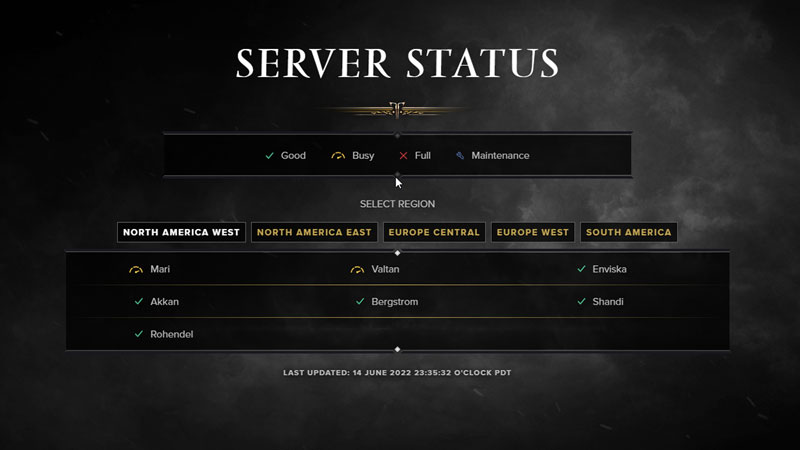
Check the Server Status for your region. You can do this by heading over to Lost Ark’s official website or typing ‘Check Server Status Lost Ark’ in your search engine. While you confirm the status of your region, and the server that you play in, remember that if it is a server issue from Lost Ark’s side there is nothing you can do. You will have to wait patiently.
Restart the Game & Steam
Although this sounds like a temporary fix, players have reportedly solved this error by simply restarting the game and restarting Steam. Maybe this will fix the error for you, but you might have to do it multiple times.
Verify Integrity of Game Files
Verify the Integrity of the Game Files to make sure that none of the game files are missing or corrupted. You can do this from your Steam by following these steps –
- Open Steam and Go to Steam Library.
- Navigate to Lost Ark and right-click.
- Click on Properties from the drop-down menu.
- Locate Local Files and Click on Verify Integrity of Game Files.
Turn Off Your VPN
VPN or Proxy might create problems to the game server and hence display the lost ark cannot connect to server exiting game error message. If you are playing with a VPN connection then we recommend you disconnect it and relaunch the game.
Windows Defender Firewall Configuration
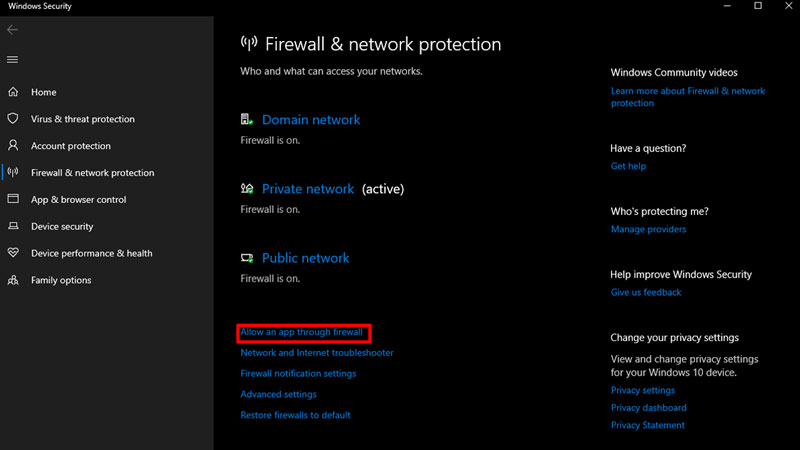
Check out what configuration you need to do to prevent your Windows Defender Firewall from interfering with the game –
- Open the Firewall & Network Protection from your Windows Security.
- Locate and click Allow an app through Firewall.
- Look for the Lost Ark files in the list.
- If you can’t find it, follow these steps –
- Click on Change Settings.
- Click on Add Another App.
- Browse for your Lost Ark Files and then Add the game to the Exception list.
Once you add the game to the Exception list, it should not have any problem with Windows Defender.
That’s all you need from this guide. While you are here, make sure you check out other guides, tips, and tricks with Gamer Tweak.