If you enjoy satisfying building games, Build an ASMR Tower offers a relaxing experience where every upgrade helps you construct an even taller structure. As you continue stacking blocks and improving your tower, Gems become an important resource for unlocking new mechanics and progressing more efficiently. That’s where Build an ASMR Tower codes come in.
You don’t want to miss out on these rewards if you’re planning on making the coolest obby in the game. Check out the complete list below.
Last checked for new codes on July 21, 2026
All Build an ASMR Tower Codes (July 2026)
- TradeUpdate – Redeem this code to get 10 Gems
- Version5 – Redeem this code to get 10 Gems
Expired Codes
There are currently no expired codes. If any of the active rewards stop working after a future update, we’ll move them to this section.
How to Redeem Build an ASMR Tower Codes
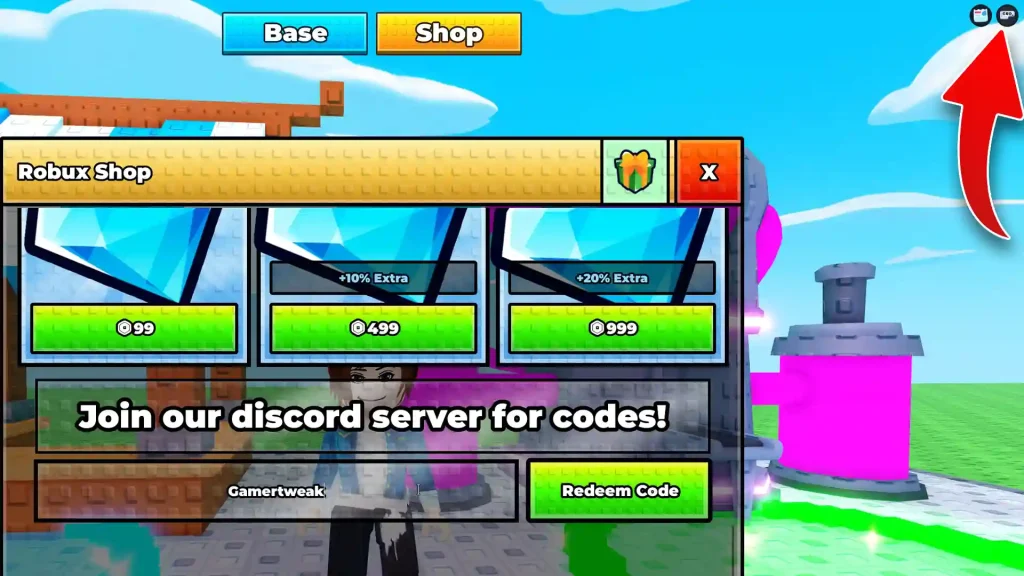
To claim your rewards, click on the Codes button at the top right corner of the game and scroll to the bottom of the window. Type your code and click on Redeem Code. Note that you need to play the game (or just be there) for at least 30 minutes – only then can you claim the freebies.
Also Read | Dino Hunters Codes
How to Get More New Codes
The easiest way to stay updated is by following the developers through their official Roblox group and Discord community channel, where they often announce new codes alongside updates and milestone celebrations. However, if you’d rather not keep checking multiple social platforms, you can bookmark this page instead. We regularly update our list whenever new codes are released, ensuring you won’t miss any free rewards.
What to Do if a Code Isn’t Working?
If you’re having trouble redeeming a code, make sure it’s entered exactly as shown. Roblox codes often require precise capitalization and spelling, so copying and pasting is usually the safest method. If the code still doesn’t work, it may have expired or already been redeemed on your account. Sometimes, newly released codes can take a short time to become active after an update, so rejoining the game and trying again later may solve the problem.