If you love Counter Strike and Roblox, there’s nothing better than the combo you’re looking for – Bloxstrike! It’s a fast-paced, competitive 5v5 shooter where every boost makes a difference and if you don’t want to miss out on free credits, you need to use these Bloxstrike codes right away!
Also Read | Sorcerer Ascent Codes
New Bloxstrike Codes (April 2026)
Note that you have to be at least level 5 to be able to claim rewards in this game.
- STILETTO
- UPDATE320
- GAMEBROKE318
- DUST_II
- LIL30MINUTEDOWNTIME
- BLOXSTRIKEXMEDAL – Redeem this code to get 100 credits
- SEASIDE – Redeem this code to get 100 credits
- 25MILLIONVISITS – Redeem this code to get credits
Expired Codes
These are the codes that are no longer working:
- WEAREBACK
- BUTTERFLYCASE
- GAMEBROKE
- 10KCCU
- 8KCCU
- 10MVISITS
- NEWYEARS2025
- QOLUPDATE
- FridayUpdate
- SORRYTHURSDAY
- 1MVISITS
- RELEASE
- SORRY
- WINTER2025
- CHRISTMAS2025
How to Redeem Bloxstrike Codes
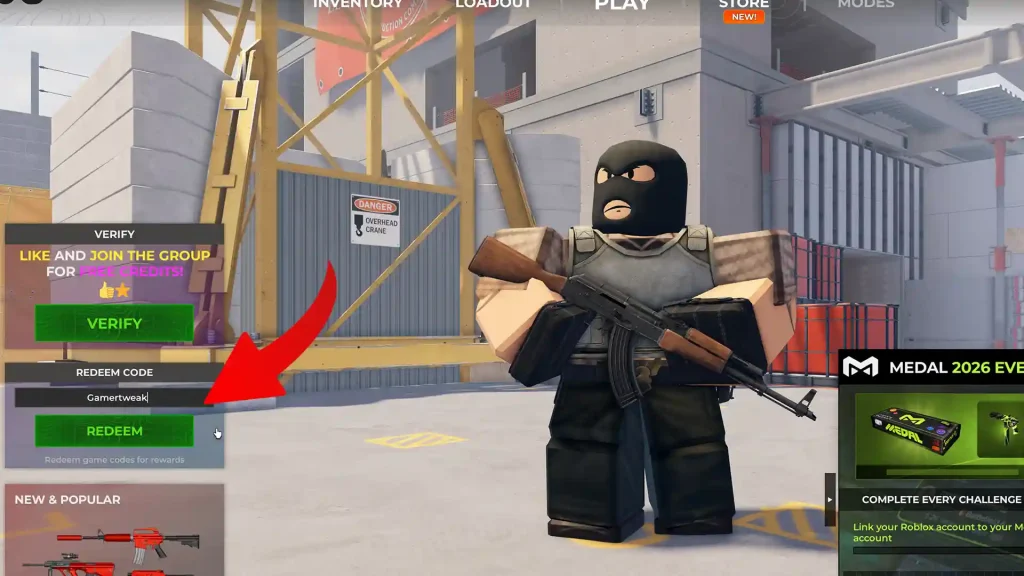
When you load up the game, check the left side of the screen. There will be a box named Redeem codes and under it, you can type a code. Hit Redeem and you will receive the rewards immediately.
Why is my Code Not Working?
If a code isn’t working, it’s usually because it has expired or already been redeemed. Most Roblox game codes are time-limited and stop working after updates or milestones. Make sure you’re entering the code exactly as shown, including correct spelling and capitalization. Check for any extra spaces and try again.
How to Get More New Codes?
New freebies are usually released during game updates, special events, or when the game reaches player milestones. Developers often share them on their official Roblox page, social media accounts, or community servers.
Bloxstrike Code FAQs
New codes are usually released during major updates, special events, or when the game reaches milestones like likes or visits. There’s no fixed schedule, so they can drop at any time.
In most cases, they work on both public and private servers. However, if a code doesn’t redeem, switching to a public server can sometimes fix the issue.
Yes, they are case-sensitive. Make sure to enter the code exactly as it appears, including capital letters and numbers.
Yes, join it here and you’ll start getting real-time updates from the devs and the community!