Home > Call of Duty > How to Play COD Cold War Zombies Solo?

Can You Play Alone In COD Black Ops Cold War Zombies?

Published Date :

In case you don’t want to play Call of Duty: Black Ops Cold War Zombies mode with friends, you can experience it in single player mode. In this guide, we will explain how to play solo in Cold War Zombies. The process is simple and all you have to do is switch a couple settings but it can get a bit confusing if you don’t know where to look. With these steps, you can start playing alone without waiting for any random players or friends you don’t want to play with.

How to Play Solo in COD Black Ops Cold War Zombies?
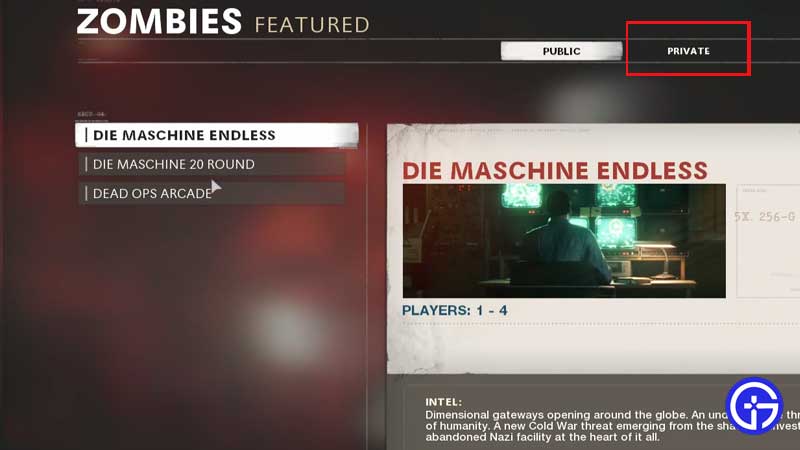
how-to-play-solo-cold-war-zombies

This is how you can play alone in Cold War Zombies and enjoy the thrill all by yourself:

  • First, head to the main menu in the Zombies lobby.
  • Choose Die Maschine Endless.
  • Then, pick Private instead of Public.
  • Select Die Maschine Solo.
  • With this option, you can enable single-player mode where no other players will join your game.
  • Start your game and be ready to fight zombies.

That is pretty much how to play solo in Cold War Zombies mode. This is ideal if your teammates are not really helping you (inexperienced players) or if you don’t want to join a game with random strangers. The reason behind it doesn’t matter – if you want to play alone, you go ahead and do it! Plus, you can try this out if you want to test your own skills and see how you fare against your enemies.

In case you want to play with friends but not with the max number of four players, this Private mode will let you do that. You can start playing a game with only two or three players and won’t have to play with a stranger just to fill up your team.

With that cleared up, we’ve got a bit more for you on Gamer Tweak. Check out how to pack a punch in Black Ops Cold War Zombies and how to Get Wonder Weapon as well. In case you are facing any issues like the game is freezing or crashing or you have low framerates on PS5, we’ve got you covered in that department as well.

  • Throw a Coin Codes (July 2026)

    Throw a Coin Codes (July 2026)

    Published Date :

    Throw a Coin’s gameplay loop is very addictive – you start by throwing a coin into the fountain, and it gives you a random item of a certain value. The fountain can drop anything from a Guitar, a TV, a Trophy, a Magnet, a Wheel, to the rare Treasure Chests. Your goal is to upgrade… Read More

  • Rintama High Codes (July 2026)

    Rintama High Codes (July 2026)

    Published Date :

    Rintama High codes can help your journey by providing free cash (Yen), Reroll Tokens, with more freebies to come in the future. They can expire at any time without warning, so, if you don’t want to miss out, this guide is for you! Last checked for new codes on July 27, 2026. New Rintama High… Read More

  • Roll Anime to Fight Codes (July 2026)

    Roll Anime to Fight Codes (July 2026)

    Published Date :

    In Roll Anime to Fight, the fighters you get make all the difference, and to build the strongest team, you need resources. Thankfully, the developers frequently share codes that provide free Gold, Trait Shards, Godly Essences, and more, which make the process much easier. If you don’t want to miss out on these boosts, redeem… Read More

  • A Guide to CS2 Trading Tools and Pro Trading Tips

    A Guide to CS2 Trading Tools and Pro Trading Tips

    Published Date :

    Successful CS2 trading is rarely based on guesswork. Experienced traders rely on data to compare prices, track market trends, and identify good opportunities before making a trade. With so much information available, keeping up with the market without the right tools can be difficult. That’s where CS2 trading tools come in. In this guide, we’ll… Read More