Narrator Voice is a huge distraction in Biomutant. Here are the exact settings to turn off Narrator in Biomutant and options to reduce Narrator Lines, so that you enjoy the game. Unlike other games, players hear the Narrator’s voice for a major chunk of the game.
How To Turn Off Narrator In Biomutant?
To Turn Off Narrator Pause the Game, go to Settings Menu and under Audio Tab you will find Narrator voice value. Set it to 0, to reduce the volume of the Narrator Voice. Players can turn off the Narrator from the settings menu. You can access the settings menu by pausing the game as well as from the home page of the game. In the settings menu go to the audio tab under which you will the “Speech” and “Narrator” options.
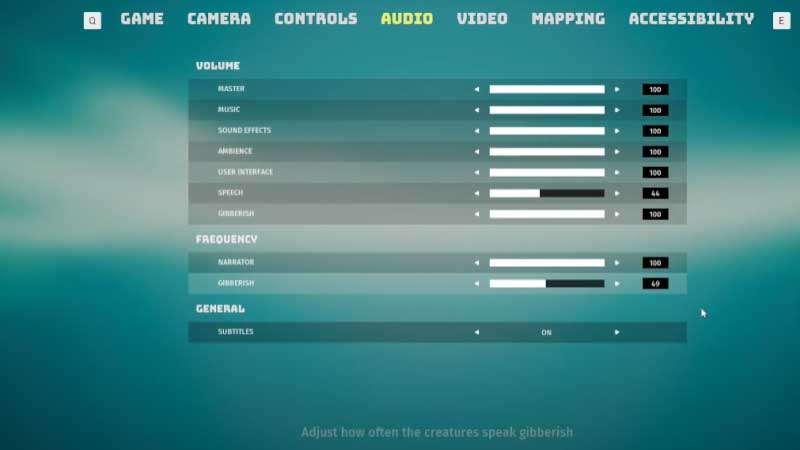
If you only want to turn off the narrator you see the “Narrator” under the Frequency section in the same Audio tab. Turning the “Narrator” option to 0 will reduce the frequency of Narrator dialogue to the most minimal but never obliviate them at all. Next to the “Speech” option you can see the level and set it to anywhere from 0-100. Setting the “speech” option to 0 will completely turn off any dialogue in the game. This will also turn off the dialogues by any other NPC in the game, so use the option carefully.
Keep in mind that these options will only turn off the audio but you will still see the dialogue subtitles. Another thing you should know these options don’t impact the dialogues in the cut scenes. This means that you will have to go through all the dialogues in the cutscenes. Some cutscenes are unskippable as well so you will have to go through them whether you like it or not.
Biomutant lays heavy focus on its martial arts style combat. The game has one of the busiest combats I have seen as there is a lot for players to do. The game has way too much going at once so the Narrator’s voice can be a bit distractive at times. That’s it for this one, do check out our article to know all about Character Creation in Biomutant.