To use Photomode in Biomutant you will have to first enable it. There are two ways to turn on Photomode in the game. On PC press Esc and click on Photo Mode from Pause Menu. On PlayStation or Xbox click the down thumbstick. Biomutant has a photo mode that allows you to take a screenshot or click photos of the scenic open world of the game and the super-cool slow-motion shots.
How to use Photo Mode?
Press both the analog sticks (L3 and R3 button) together to activate Photo Mode in Biomutant. The same controls work for taking screenshots in Biomutant. This will open up the photo mode which will still the game at that moment. After the game gets still you will be able to use the photo mode options.
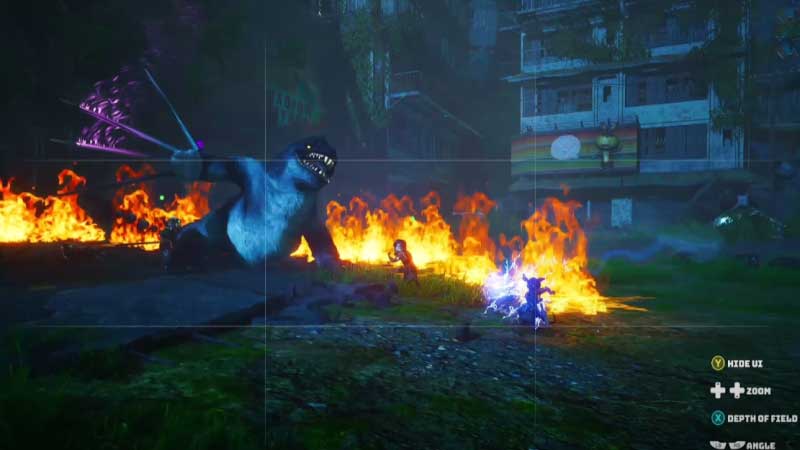
You can also access the Photo through the pause menu Players can change the camera angle zoom in and out in the photo mode. You can also adjust the depth of the photo and hide the Game UI in the photo mode. Once you have fixed the perfect shot use the regular screenshot controls of your console to take the photo.
The photo mode options in Biomutant are limited when compared to other games. No filters or edit features keep the photo mode very simple and direct. This is a good sign as it keeps the focus on the game. This is also what the developers want players to focus on.
Biomutant boasts a big open world full of lush green lands and colorful furry characters. The resolution of the game is also 1080p and 45 fps which elevates the already beautiful world of the game. The game has a lot of colorful characters and villains adding to the already colorful open world of the game making it very photogenic.
There are specific attacks as well like the gun attack in super Wung-Fu state. These attacks pan out in slow motion giving you more reasons to use the photo mode. There are some rumors as well that the developers will increase the resolution of the game to 4K. This will make players use the photo mode more often. Now that you know all about the Photo mode, do check out our article to know how to upgrade weapons and armors in Biomutant.