With the Best Controller Settings, you can easily win races. But what is the need for it? Well, to drive using a Controller is more difficult than to drive using a keyboard. At least, that’s what I personally feel. With the Best Settings, you can practice and elevate your driving skills in no time. And this is what you will be finding in this guide too – The Best Controller Settings in the Crew Motorfest. So take a look below to get started.
Best Controller Settings in the Crew Motorfest
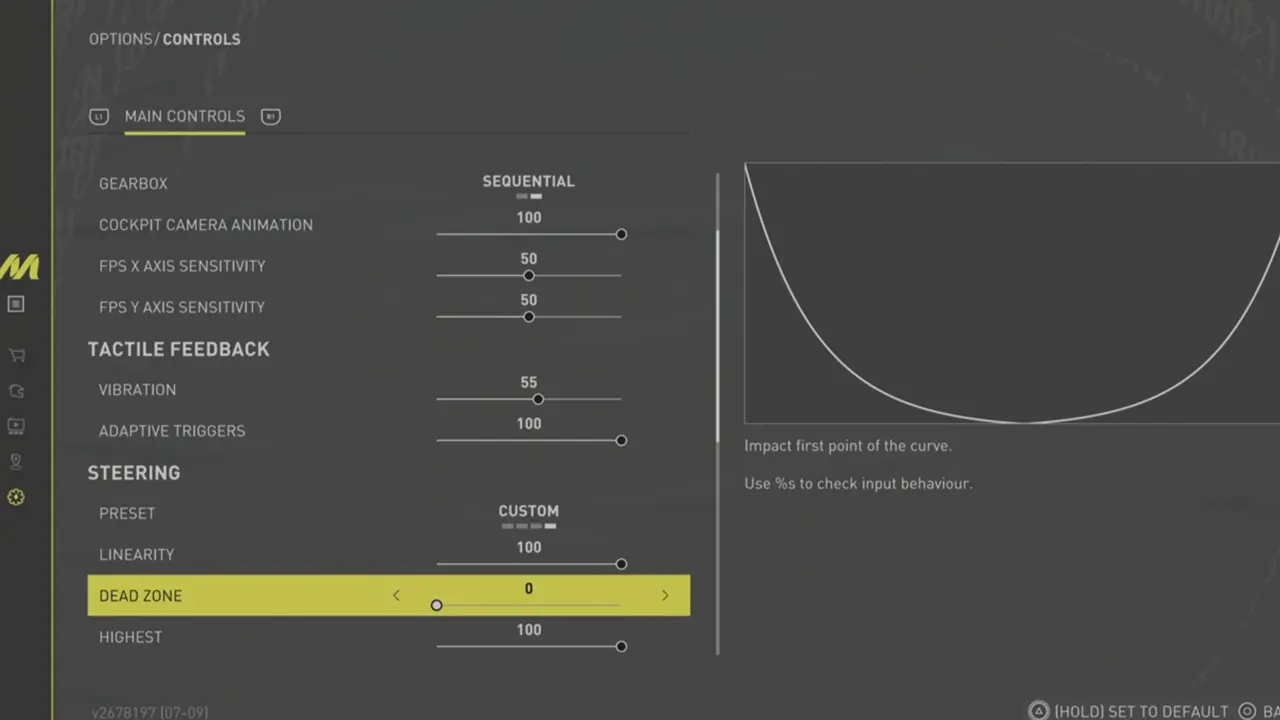
Check out below to know the Best Settings for your Controllers so that you never lose in the Crew Motorfest:
- General
- Gearbox: Sequential
- Cockpit Camera Animation: 100
- FPS X Axis Sensitivity: 50
- FPS Y Axis Sensitivity: 50
- Tactile Feedback
- Vibration: As per your preference
- Adaptive Triggers: As per your preference
- Steering
- Preset: Custom
- Linearity: 100
- Dead Zone: 0
- Highest: 100
- Throttle
- Preset: Custom
- Linearity: 0
- Dead Zone: 0
- Highest: 100
- Brake
- Preset: Custom
- Linearity: 0
- Dead Zone: 0
- Highest: 100
Please keep a note that you won’t be mastering these Controller Settings quickly. In fact, you’ll have to practice and I am sure that eventually, you will find your sweet spot. Also, you are free to tweak these Controller Settings a bit in the Crew Motorfest. Who knows, maybe you can find your perfect winning combination through this.
Apart from in-game settings, you can also use the Best Starter Cars to gain momentum early on. For that, be sure to check out our guide on it. Lastly, special thanks to Gvids for sharing these Controller Settings with us.
And now that you have the Best Controller Settings in the Crew Motorfest, ensure to make the most out of it. If you are new to this game and want to enjoy it with your friends, then we can help you with it. Just check out our guide on How to Play with Friends and claim all the fun. For more such guides, you can head over to our dedicated section for The Crew Motorfest right here at Gamer Tweak.