
Home > Gaming Guides > Back 4 Blood Barbed Wire

Back 4 Blood: How To Use Barbed Wire

Updated Date :

The Barbed Wire is an offensive equipment item in Back 4 Blood. Back 4 Blood literally picks up from the time you were Left 4 Dead. Get it? The Barbed Wire or Razor Wire is a pretty handy item in both these games. It allows you to fortify and hold down your area against the hordes of zombies coming your way. So, scroll down and find out how to use the Barbed/Razor Wire.

How to use Barbed or Razor Wire in Back 4 Blood?
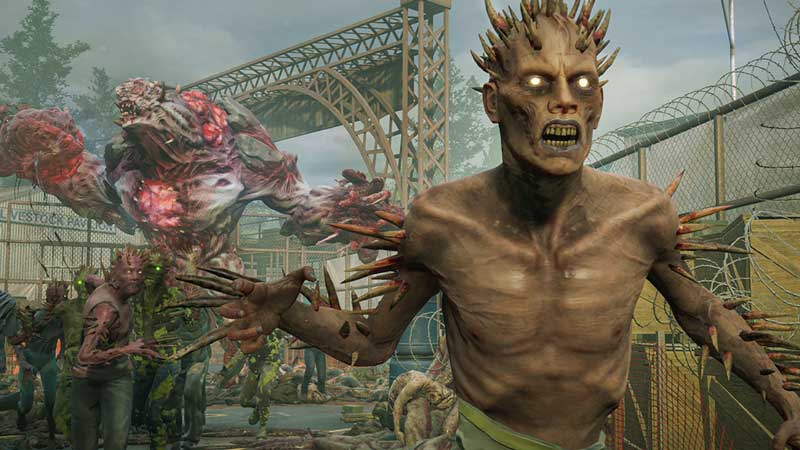
Back 4 Blood Barbed Wire: How To Use Offensive Item

To use the Barbed Wire you will first have to purchase it from the Vendor or find it around the map. If you prefer to purchase the Razor Wire from a Vendor all you will have to do is go to the Safe Room. Inside this Safe Room, you will be able to see a locker. Simply go over to this locker and you will come across an entire inventory including weapons, ammo, and various different equipment items.

Also Read: How To Fix ‘The Profile Service Is In Maintenance Mode’ Error In Back 4 Blood

All you have to do now is choose the Razor or Barbed wire option in the Vendor menu of Back 4 Blood. Once you do this, the Barbed Wire will be added to your player inventory in the Offensive Item slot.

Now, to use the Barbed Wire you will have to click the preset button for the Offensive Item. To choose the Offensive Item from your inventory click on RB/R1 for Xbox/PlayStation respectively. Once you choose this offensive item simply turn the camera around with the analog stick.

Now, you will have to look towards the area where you need to place it. After this, simply click on the button prompt to place it wherever you want.

You will also be able to place the Barbed Wire on top of Wooden Planks to fortify the walls. Also, make sure you have a teammate who has been assigned the role of fortification. This in turn will make it easier for you to get through the game.

This is everything you need to know about how to use Barbed/Razor Wire in Back 4 Blood. While you are here you can also have a look at how to Ping Enemies and Ammo drops.

  • Clean the Squishies Codes (July 2026)

    Clean the Squishies Codes (July 2026)

    Published Date :

    There’s something surprisingly satisfying about picking up the cute Squishies and putting them back on their designated shelves. If you’re interested in getting some unique rewards including free Squishies, this guide is for you. Here’s the complete list of all the working rewards. Last checked for new codes on July 13, 2026 All Clean the… Read More

  • Scratchy Loot Codes (July 2026)

    Scratchy Loot Codes (July 2026)

    Published Date :

    If you want a little luck boost while playing Scratch Loot, codes come to the rescue! In this experience, you scratch cards, reveal symbols, earn coins, and keep upgrading to get better rewards. To make this journey easier, the developers regularly release codes, and if you don’t want to miss out, redeem the freebies mentioned… Read More

  • My Squishy Box Store Codes (July 2026)

    My Squishy Box Store Codes (July 2026)

    Published Date :

    Every new customer brings another opportunity to grow your business and expand your collection of adorable squishies. To help you even more, the devs release My Squishy Box Store codes that provide free cash and in-game items. These freebies that can help you upgrade your shop faster and earn more while handling a steady flow… Read More

  • GTA 6 Players in Australia May Need Age Verification Due to New Online Safety Rules

    GTA 6 Players in Australia May Need Age Verification Due to New Online Safety Rules

    Published Date :

    Australian players could have an extra requirement to meet before accessing Grand Theft Auto VI’s online features. Under the country’s updated online safety regulations, games classified as R18+ may need to verify that players are adults instead of relying on a simple age confirmation (as per news.com.au). If GTA 6 falls under those requirements, Rockstar… Read More








