
There are times when you might want to appear offline in Roblox. You may want to play some game alone, might be playing with some random people online, or other reasons. Whatever the case may be the feature to hide your visibility from your Friends is needed in Roblox. And since it is a massive game platform, where you can find a ton of games to play, you are bound to meet some friends online. So in this guide let us find out whether you can appear Offline in Roblox and how to do it.
Can you Appear Offline in Roblox?
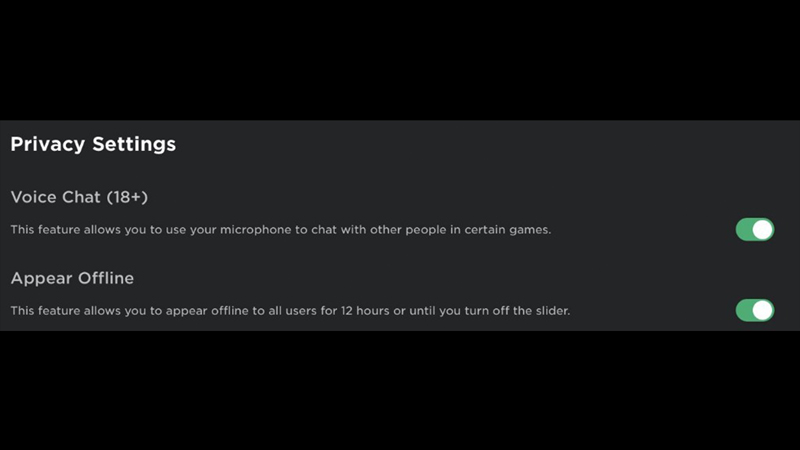
At the time of writing this article, you cannot appear offline. The closest information we have about this feature comes from Twitter user RBXNews. They posted this image to inform their followers about updates on Roblox’s offline feature. This feature should be visible under the Privacy Settings. But as of now, you can’t find this setting on the PC or the mobile version of the game.
How to Appear Offline in Roblox?
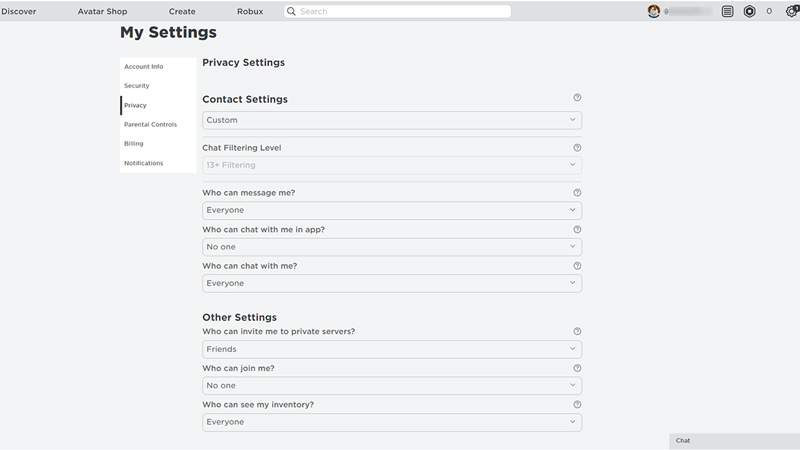
While the feature isn’t out yet as per the post you should be able to change your visibility through Privacy settings. Below are the steps to find Privacy Settings in Roblox:
- Privacy Settings for Roblox PC
- Go to Roblox.
- Click on the gear icon on the top right corner of the screen.
- Here choose settings and click on the Privacy option.
- Once the feature is live you should find the settings under this sub-section.
- Privacy Settings on Roblox Mobile
- Launch the Roblox app.
- Tap on the three dots in a circle icon on the bottom left corner of the screen.
- Scroll down and click on the Settings button.
- Here choose Privacy.
- Just like the PC version once the feature is live for mobile you should find the option to change visibility here.
We will update this article with the latest steps on appearing offline when the feature is out, so check back soon.
That sums up this guide on whether you can appear offline in Roblox and how to do that. If you are new to Roblox then you should find our other guides helpful like how to whisper and how to give Robux.










