Since Modern Warfare 2 is out on early access, players who have pre-ordered it digitally are already joining the campaign. While you cannot play multiplayer yet, being reunited with your favorite characters is enough. MW2 has also tried to step up in its Graphics as there is the new addition of AMD FidelityFX CAS in Modern Warfare 2. Since this helps with the graphics and at the same time a better experience, this might be a useful tool to access. In this guide, we will show you all there is to know about this graphic setting and how to enable it in MW2. So let’s check out this guide and see how to get a better FPS and sharp pixelated graphic.
What is AMD FidelityFX CAS in Modern Warfare 2?
Simply put, this setting in MW2 will be quite helpful to get a better experience in terms of graphics. It will help you get a better chance of spotting enemies at the same time improve your frame rate.
Thus, AMD FidelityFX CAS in Modern Warfare 2 is an upscaling technology with a Contrast Adaptive Sharpening feature. Put together, they improve visuals and increase the frame rate by sharpening the pixels.
How to Enable AMD FidelityFX CAS
Now that we know the system, we still have to see how to enable it. Fortunately, it is not quite difficult and will only need a minute of your time. Here’s how to enable AMD FidelityFX CAS in Modern Warfare 2:
- While in the main window of MW2, head over to the Settings.
- After that, head over to the Graphics tab in the settings menu.
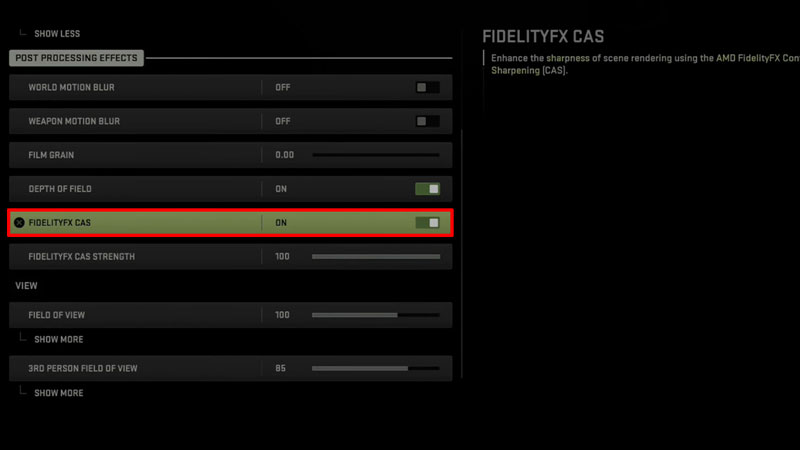
- Once you are here, look for the Post Processing Effects subheading and then toggle to the FidelityFX CAS and turn it on in MW2.
Now that the setting is on, you can adjust the sharpness and strength of FidelityFX CAS. This will allow your pixels to be sharper and will level the extra sharp visuals in the game. Thus putting a balanced graphic in effect.
That’s all there is on the AMD FidelityFX CAS in Modern Warfare 2. While you are here, make sure you check out our other MW2 guides only at Gamer Tweak.