Home > Overwatch 2 > How To Add Phone Number For SMS Protect In Overwatch 2

How To Add Phone Number Overwatch 2 SMS Protect

Published Date :

Now that you know why OW 2 asks for your phone number, here’s how to add your number to Overwatch 2 so that you stay protected. This SMS Protect feature has been added since the game went free-to-play and so, Blizzard needs to take extra precautions to keep the game fun for all players. Follow the steps below to make it happen.

How to Add Phone Number in Overwatch 2 (SMS Protect)

To add your phone number for OW2’s SMS Protect, all you have to do is add it to your Battle.net account.

  • Log into Battle.net from a browser on Mobile or PC.
how to add phone number ow2

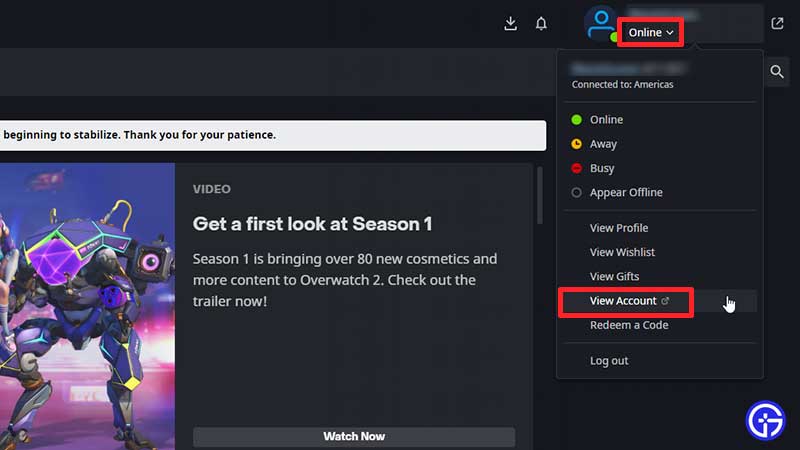
  • You can also open your Battle.net client and click on the downwards-arrow under your profile name at the top right of the screen. Click on View Account and you will be taken to your account page on your browser.
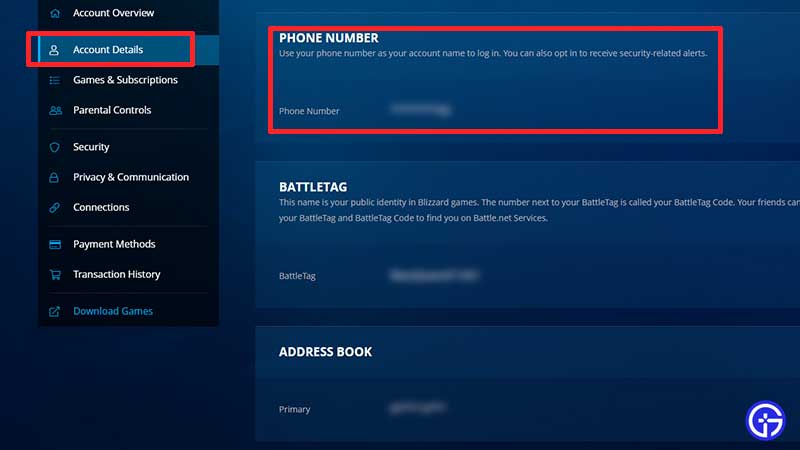
  • Now, from the menu on the left, click on Account Details.
how to change update phone number battle net

  • Scroll down to Phone number and add your phone number there. If you want to change or update your phone number, this is where you can edit it as well.
  • You will get an SMS with a verification code that you must add to the Battle.net page.
  • This will connect your Battle.net account and phone number and so, you will be able to play Overwatch 2 on whichever platform you prefer.

Eligibility & Limitations of Adding a Phone Number

There are some limitations to using phone numbers in OW2. Here’s a snippet of the full article posted by Blizzard:

Battle.net Phone Notifications are designed for text-enabled mobile phones:

  • Messaging apps like iMessage (iOS) or WhatsApp (iOS, Android) are not supported.
  • Mobile phones with prepaid plans may not work with the phone notification service.
  • Phone notifications cannot be used with Voice over IP (VoIP), and VoIP numbers that are transferred to a local provider are not eligible for the service.

That’s everything to know about adding a phone number to play Overwatch 2. You will also need some OW2 Coins to unlock cosmetics, here’s how to get them for free.

  • ZZZ Version 3.0 Is the Biggest Patch Yet: Here’s What Changed and Why It Matters More Than You Think

    ZZZ Version 3.0 Is the Biggest Patch Yet: Here’s What Changed and Why It Matters More Than You Think

    Published Date :

    Zenless Zone Zero 3.0 patch is the biggest patch since the launch of this game. With the introduction of a new element, a rarity tier, a free anniversary character, and an explorable region, you will find this patch launch exciting. It is necessary to learn what you should prioritize from all of these because of… Read More

  • Anime Duelists Codes (July 2026)

    Anime Duelists Codes (July 2026)

    Published Date :

    Anime Duelists follows the tried and tested formula of spinning stars to unlock fighters, sending them into battle and collecting rewards. If you want to get unique fighters, abilities, and progress through various realms, you need these code rewards! You can get anything from free Gems, Trait Rerolls, Stats Reroll, Super Luck, Star Speed potion,… Read More

  • Mini Cup Codes (July 2026)

    Mini Cup Codes (July 2026)

    Published Date :

    In Mini Cup, you open up packs to unlock footballers, build houses, and win matches against rival teams. This makes it a perfect mix of some of the most popular gameplay loops for soccer fans on Roblox. To grow your club, you’ll need cash, as well as special packs, which is where Mini Cup codes… Read More

  • Be The Final Boss Codes (July 2026)

    Be The Final Boss Codes (July 2026)

    Published Date :

    Now you can be the final boss! In this experience, you summon minions to fight for you and take down waves of heroes. To level up, you’ll need plenty of coins and various resources, which is where Be The Final Boss codes come in handy. If you wish to boost your character and stay one… Read More