Home > Gaming Guides > Add People In Rec Room

How To Add People In Rec Room (Invite Friends)

Published Date :

Are you looking to add people to your friend list in Rec Room? Bringing your squad to play alongside you in this multiplayer adventure is always the best plan. Luckily, sending and accepting friend requests is very simple. But for players who are trying to get accustomed to this game’s mechanics, doing any task can get tricky. And there’s no harm in seeking assistance while trying to add friends to your party in Rec Room. So without any further ado, here’s how you can send friend requests to any person.

How to Add Friends in Rec Room

Here’s how you can add people to your Rec Room account.

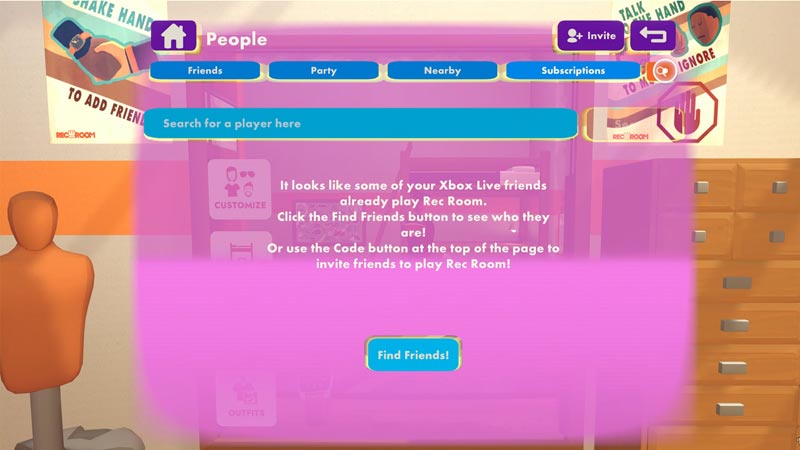
  • To send a Friend Request, open your Watch Menu.
  • After that, click on the People option from the list.
Add People Rec Room

  • Next, click on the Search option on the top right.
  • Add your friend’s username and you will see a list of people appearing on the screen.
  • Now, click on the green button associated with the person’s username.

Now that you know how to send a friend request, here’s how a person can accept it.

  • Once you add a person in Rec Room, they will receive a message in-game.
  • To accept the friend request, open your Watch menu and enter the Messages section.
  • From there, a list of notifications including a friend request can be seen.
  • You can accept such requests to add people to your Friend list in Rec Room.

How to Party Up with Friends

To invite friends to your party, click on the blue Party Up button next to any person in your Friend list. Alternatively, you can click on a person’s profile, select the Party Up option, and invite them.

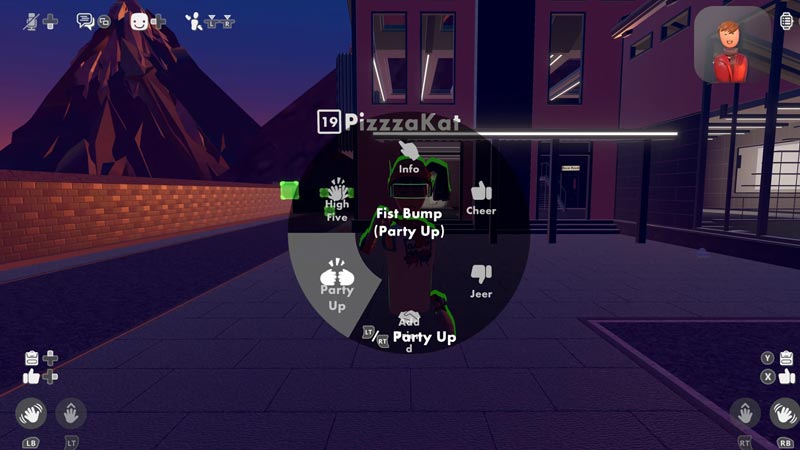
Besides both of these methods, you can also fist-bump friends & invite them to your Rec Room party. You just need to open the emote wheel and select the Party Up (Fist Bump) emote. After that, get close to any player and use that emote to party up.
Add People Rec Room
Image Source: PepperHomie Game Reviews and Guides

That’s how you add people in Rec Room & Party up with them. If you are a regular player and running out of funds, then we can help you out. Check out our guide and learn how to Get Tokens in Rec Room.


  • Coach a Fighter Codes (August 2026)

    Coach a Fighter Codes (August 2026)

    Published Date :

    In this boxing game, you don’t throw the punches yourself – you’re the coach who watches matches and helps train fighters. You’re tasked with upgrading your gym, improving your roster, and climbing through stronger leagues, which is why you’ll need every boost you can get. So, make sure to redeem these Coach a Fighter codes… Read More

  • Samurai Duels Codes (August 2026)

    Samurai Duels Codes (August 2026)

    Published Date :

    Only the strongest samurai survive in the arena, and climbing through increasingly difficult duels means constantly improving your character. For this, you’ll need to unlock various Crates, unlock Abilities, and Classes, which is where Shards come in; luckily, Samurai Duels codes provide them for free. If you don’t want to miss out, here’s the complete… Read More

  • Garden Cleaner Evolution Codes (August 2026)

    Garden Cleaner Evolution Codes (August 2026)

    Published Date :

    If you love relaxing and cozy cleaning games, this one’s for you! But keeping every garden spotless isn’t as easy as it sounds. As you unlock larger areas, you’ll need better equipment and plenty of upgrades to deal with fallen leaves efficiently. This is why redeeming the latest Garden Cleaner Evolution codes can give you… Read More

  • Crunch My Butter Codes (August 2026)

    Crunch My Butter Codes (August 2026)

    Published Date :

    Looking for the latest Crunch My Butter codes? This satisfying Roblox simulator lets you crunch different types of butter, earn cash, unlock better butter, and keep your buttery empire growing. While the game continues to receive updates, many players are also hoping for redeemable codes that offer free Cash or other rewards. Here’s the complete… Read More