Street Fighter 6 has cross-platform play right from the start so players can invite their friends and play online or custom games with them. Although the mechanism is not complicated, players might find it confusing to add friends to their game initially. However, since we have already played a couple of online and custom games, we can show you exactly what you need to do. Since crossplay is allowed, players don’t even have to worry about their friends being on different platforms.
How to Add Friends in Street Fighter 6
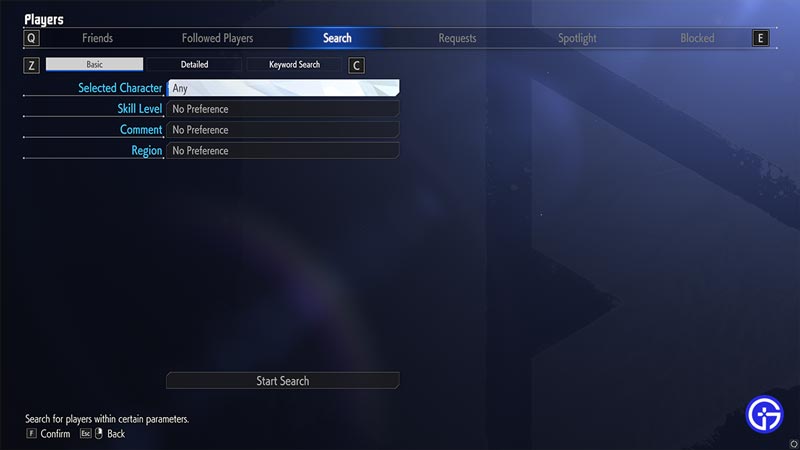
First and foremost, players will need a Capcom ID if they want to play SF6. If you intend to play online with your friends, you will have to add them from the Players Tab. While in the main window, Press Y or Triangle on your console to open the players tab. You can check your friends, followers, and requests. There is also the Search option that you will need to add your friends so you can later on invite them to play Street Fighter 6 with you.
How to Invite Friends to Play in SF6
The Fighting Ground and Battle Hub will allow players to invite and play with friends in Street Fighter 6. The Fighting Ground mode allows you to private matches that can be local or online depending on how you choose to play. Once you have added your friends, you can simply customize your rules and invite them over to fight.
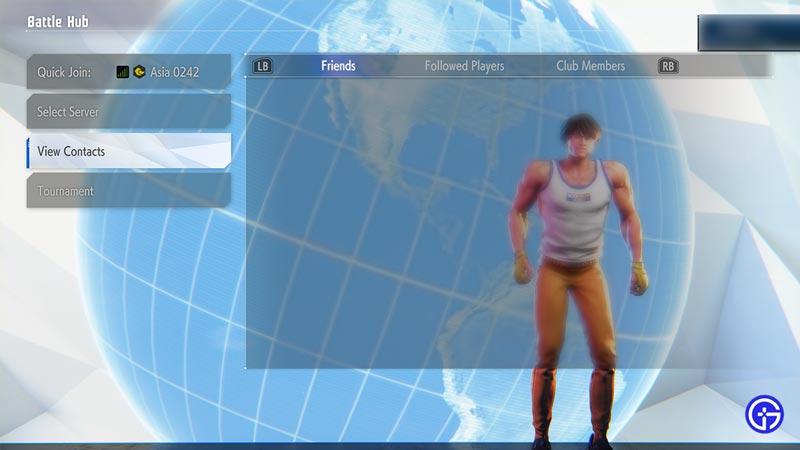
The Battle Hub is an area where players can play online on different consoles or set ups and since crossplay is available, there are no restrictions to it. Simply head over to the Contacts section and you will find all those that you can play with over there. Simply invite your friends to play Street Fighter 6 online from this list. Crossplay is enabled right from the start and you can get opponents from any platform while playing online.
That’s all we have on how to play online with friends in SF6. While you are here, check out our SF6 Tier List and how to get Fighter Coins right here at Gamer Tweak. For more Street Fighter 6 guides, do check out our dedicated section.