
Home > Among Us > Account Linking In Among Us

How To Link Your Accounts In Among Us

Published Date :

The recent update of Among Us has brought us a lot of new content like Roles, Cosmetics, and the new Account Linking feature. It is a feature that allows you to merge your accounts across all platforms. In today’s article, I will be explaining how to Link your Among Us Accounts.

How to Link your Accounts in Among Us
account linking in among us

Account Linking is one the best feature to be added to Among Us. It allows players to play on a single Account no matter what platform they use. It also merges all the Accounts you have on other platforms and keeps all of the progress, currency, and cosmetics you had purchased. Doing it is not a difficult task but if done incorrectly will lead to disasters. You can lose all of your in-game progress and worse your purchased cosmetics. Here’s what you will have to do to Link your Accounts in Among Us.

Steps to Connect your Accounts

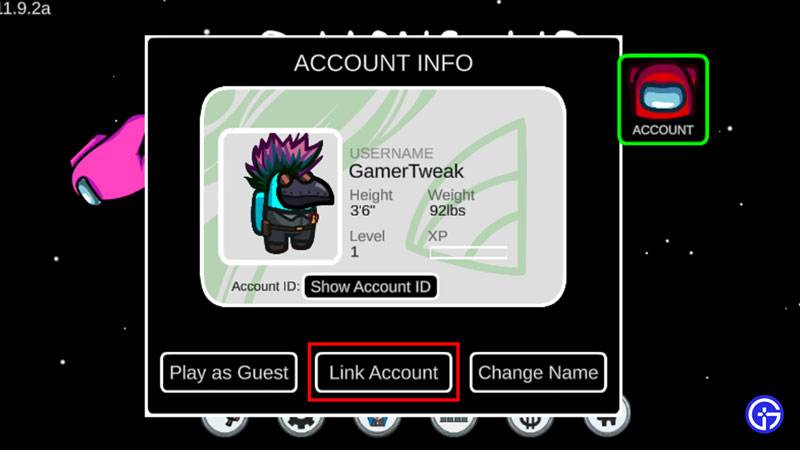
Firstly, open up the game on your device. Once that is done, there will be a Red Crewmate on the top left of the screen with the Account word under it. Click on the Crewmate and you will reach a page about your Account Info. Next click on Link Account which is at the bottom of the page. A new window will pop up, it will ask you to Reset your Among Us Account. Make sure you read the message before confirming the reset. Once you click on the Reset Button, it will show you a window of Linking Existing AccountA website of Innersloth and a Code will be there on that window. Go to the website and copy the code from that window.

Now you will see a page of all the platforms Among Us exists on. Select the one you want and enter your credential. After adding the credentials, it will ask you to enter that code. Enter it and confirm. Once you have done that, your Accounts will get connected in Among Us.

This was all about Account Linking in Among Us. Hopefully, this guide has helped you in getting your favorite cosmetics together. You can also check our guides on Setting Up Roles and Using A Controller in Among Us


  • Grandblue Codes (August 2026)

    Grandblue Codes (August 2026)

    Published Date :

    Grand Blue is a Roblox pirate adventure where you can explore islands, fight powerful enemies, master different fighting styles, and hunt for Cursed Fruits with special abilities. As you get stronger, you’ll also need to improve your character and prepare for tougher battles. Luckily, Grand Blue codes can give you free rerolls to help with… Read More

  • Can You Date Lucia in GTA 6? Here’s What Rockstar Revealed

    Can You Date Lucia in GTA 6? Here’s What Rockstar Revealed

    Published Date :

    GTA 6’s latest gameplay reveal has answered one big question about Jason and Lucia: their relationship will play an important role in the game. In the Netflix footage, we saw plenty of clips and cutscenes that indicate that they will spend a lot of time together. But can players actually date Lucia, or is their… Read More

  • Chasing Codes (August 2026)

    Chasing Codes (August 2026)

    Published Date :

    Chasing is a where you play as a survivor or killer – if you’re a survivor, your goal is to complete all objectives and stay alive until 6:00, and, if you’re the killer, you’re tasked with killing every survivor. While you’re at it, you can redeem all new and active Chasing codes that can provide… Read More

  • Will GTA 6 Have First-Person Mode? Latest Footage Leaves Fans Wondering

    Will GTA 6 Have First-Person Mode? Latest Footage Leaves Fans Wondering

    Published Date :

    GTA 6’s latest extended look has given players a closer look at the game’s action, story, driving, exploration, and open world. However, the gameplay steers away from one familiar feature: first-person mode. The new footage shared by Rockstar has brought back questions about whether GTA 6 will let players switch between third-person and first-person perspectives… Read More







