
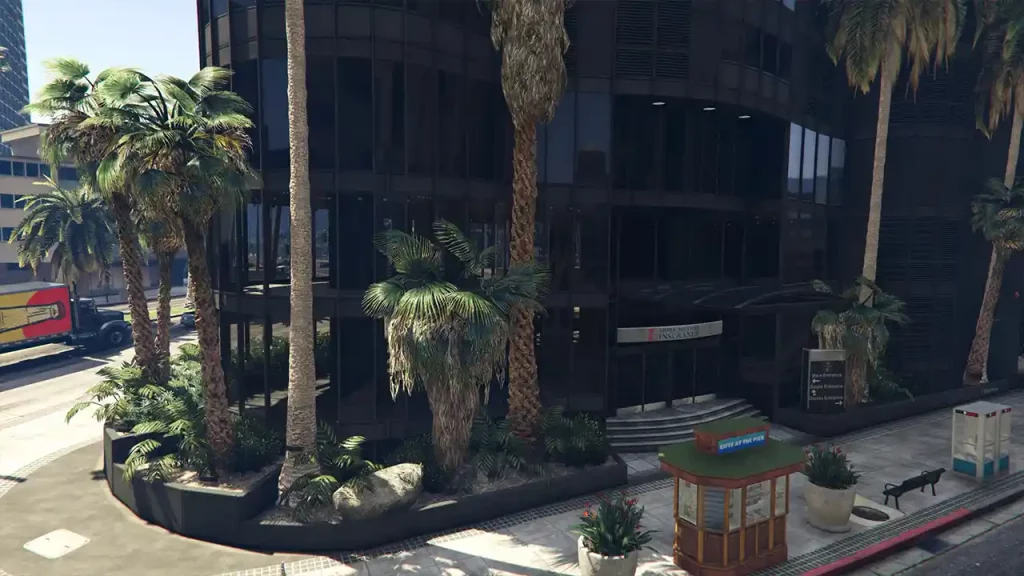
GTA 5 Remastered and Enhanced Mod from Larcius is the closest thing we have on PC to the promised “Expanded & Enhanced” version released on March 15, 2022. This mod features better shadows, draw distance upgrades, improved lighting quality, increased population, increased vegetation density, texture, traffic variety, and more.
Many players face issues like mod crashes in games with errors like ERR_FIL_PACK_3, corrupted game config, and more. So today, we will help you find the right way to install this mod and get it working quickly. So let’s get started.
GTA 5 Remastered and Enhanced Mod Features
GTA 5 Remastered and Enhanced mod adds new features to the vanilla game like:
- Added 1000+ Bushes
- Added 120+ Rocks
- Added 240+ Cactuses
- Added 280+ Potted Plants
- Added 3400+ Palm Tree Yucca Palms
- Added 460+ Seats & Tables
- Added 5000+ Trees
- Added 750+ Misc Vegetation
- Added Litter
- Added Villas
- Better Shader
- Better Shadows
- Better Water Reflections
- Draw Distance Upgrades
- Enhanced Water Puddles
- Extra Card Piles
- Food Vans
- Hotdog Stands
- Improved Lighting Quality
- Improved Reflection on Vehicle Models
- Improved Wet Streets
- Increased Population
- Increased Vegetation Density
- More Boxes
- More Mansions
- Reflections of Vegetation
- Reworked Area at Hotel Von Crastenburg
- Texture
- Traffic Variety
How to Install GTA 5 Remastered and Enhanced Mod
To ensure a smooth experience with mod, please download the appropriate file based on your intended use:
- *-SP: For Singleplayer/Story mode
- *-FiveM-Client: For use on a FiveM server (personal use only)
- *-FiveM-Server: For running a FiveM server (providing the map to all players)
If you’re using Forests of San Andreas, please install version 4.0 or newer to avoid collisions, duplicate props, and missing props in certain areas. Many trees and other vegetation have been moved to the Forests of San Andreas from GTA 5 Remastered and Enhanced Mod.
Our mod is designed to work with the original gameconfig.xml without any heap adjustments. However, you might need to modify the gameconfig.xml and heap settings if you’re using multiple mods. Try using the mod without these adjustments first, and if you encounter crashes, please install the following add-ons:
We will walk you through manually installing and uninstalling the GTA 5 Remastered and Enhanced Mod, ensuring a seamless experience when enjoying this impressive visual overhaul.
Installing Mod with OpenIV
To make installation simple and efficient, follow these steps to extract and install the mod using OpenIV’s Package Installer:
- Extract the “GTA V Remastered Enhanced v*.oiv” file to a location of your choice.
- Open the OpenIV application and navigate to Tools > Package Installer.
- Select the “GTA V Remastered Enhanced v*.oiv” file you extracted earlier.
- OpenIV will automatically install the maps and an adapted shader, ensuring accurate reflection rendering.
You’re ready to enjoy the mod’s enhanced visuals and immersive experience.
Manual Installation
- Maps:
- Create a new folder called “vremastered” in the directory: Grand Theft Auto V\mods\update\x64\dlcpacks
- Extract the “GTA V Remastered Enhanced v*.oiv” file and open it using a ZIP program (e.g., 7zip, WinZIP, WinRAR)
- Extract the “dlc.rpf” file from the content\dlc folder to: Grand Theft Auto V\mods\update\x64\dlcpacks\vremastered* The final directory should look like this: Grand Theft Auto V\mods\update\x64\dlcpacks\vremastered\dlc.rpf
- Use OpenIV to edit the file located at Grand Theft Auto V\mods\update\update.rpf\common\data\dlclist.xml
- Add a new line “<Item>dlcpacks:/vremastered/</Item>” before the line “</Paths>”
- Shader:* Extract the file “default.fxc” from the content\shader folder within the “GTA V Remastered Enhanced Revised v*.oiv” file using a ZIP program (e.g., 7zip, WinZIP, WinRAR)
- Copy the extracted “default.fxc” file to Grand Theft Auto V\mods\update\update.rpf\common\shaders\win32_40_final using OpenIV.
- You may need to create the folder “win32_40_final” if it doesn’t already exist.
Here’s a detailed video from @GAMING4LIFE247 on how to install Forests of San Andreas:
Here’s a detailed video from @conradcarter6348 on how to install GTA 5 Remastered and Enhanced Mod:
That’s everything you need to know about the amazing mod. If you enjoy playing the multiplayer component as much as the single-player part, then make sure you check out our GTA Online Guides page for more tips and tricks.











