Home > Gaming Guides > Steps To Transfer BTD6 Data Via Ninja Kiwi Linking Code

How To Sync Data Via Ninja Kiwi Linking Code – BTD6

Updated Date :

Ninja Kiwi is known for their popular game title known as Bloons TD. This title has various installments that you can play for free on several platforms. As the games are out there for a long time many veteran players are already holding a good spot on the leaderboard. Along with thousands of hard-earned medallions, which they don’t want to lose at any cost. However, that brings us to times when you want to transfer your data to a new device, but can’t remember the email ID password that you’ve linked the game with. For such cases, the devs have already come up with a linking code feature that can come in handy. If you are struggling with the same issue, then we’ll help you get & use the Ninja Kiwi Linking code so your BTD6 progress doesn’t go down the drain.

How to Transfer Data Using Ninja Kiwi Linking Code

Here’s how you can get Ninja Kiwi linking code to sync your data into a new device. Before you begin make sure you have a device that is already logged in with your game account.

  • First, open the game on the device that already has access to your game account.
  • Next, click on your profile and select the Manage Profile option.
  • After that, select the Get a Linking Code option and note down the code.
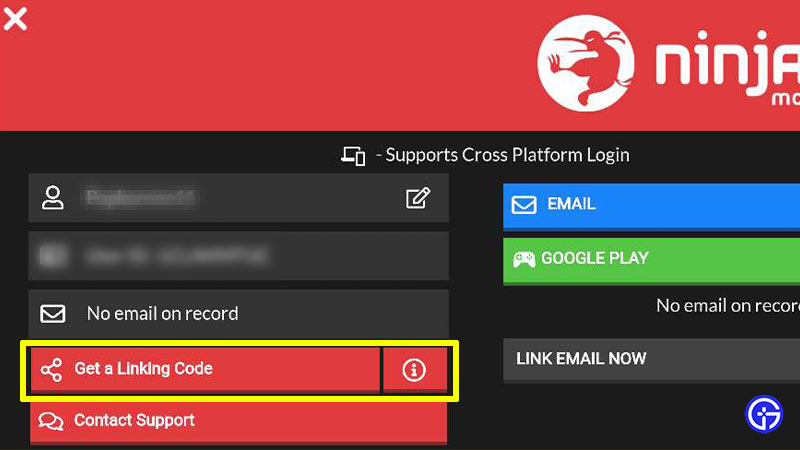
How to Sync Data Using Ninja Kiwi Linking Code

  • Then, launch the game on the device that you want to sync your data to.
  • Here, click on the option saying I’ve played before.
  • After that, go ahead confirm your age and click on the option saying I have a Linking Code.
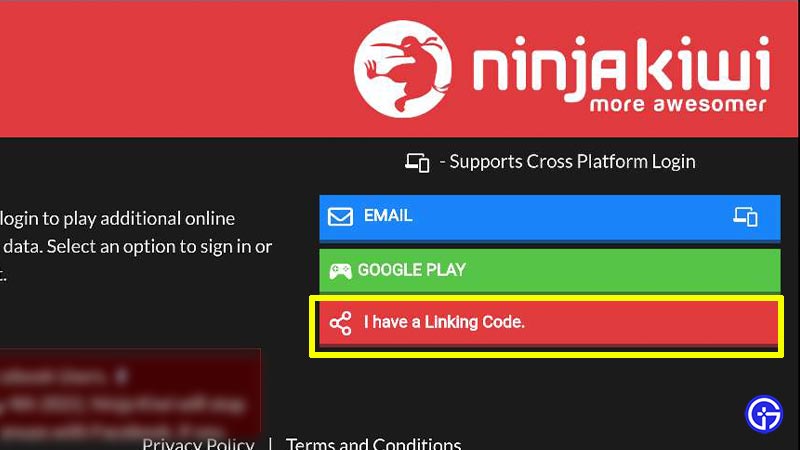
Transfer Data Using Ninja Kiwi Linking Code

  • Now, simply enter the linking code and you’ll be good to go.
  • Doing so will sync your existing data to your new device safely.

However, make sure you do the process quickly, or else you might need to repeat it. That’s because the Linking code doesn’t last for long and expires after 10 minutes. That sums up everything about how you can use the Ninja Kiwi Linking code to transfer data. If you play such games quite often then check out other Video game guides for more tips & tricks.


  • Heal your Injuries Codes (August 2026)

    Heal your Injuries Codes (August 2026)

    Published Date :

    Heal your Injuries is a JJK-inspired game, where you need math to heal yourself as you get hit by bombs, weapons and more. While playing, you will need EXP and Energy to progress, and thankfully, Heal your Injuries codes drop exactly that! Here’s a complete guide with all the latest rewards and how to claim… Read More

  • Steel Crossfire Codes (August 2026)

    Steel Crossfire Codes (August 2026)

    Published Date :

    Steel Crossfire is a thrilling PvP robot-fighting game inspired by Transformers, so yes, you can change into a vehicle, get into Jet mode, and get into some explosive battles. To make things interesting, you can unlock more characters and skins using Shards, which is what Steel Crossfire codes frequently drop! Here’s the complete list of… Read More

  • CookieRun: Crumble Codes (August 2026)

    CookieRun: Crumble Codes (August 2026)

    Published Date :

    The Devsisters Corporation is back with another Cookie adventure, and like other games, there is a code redemption system in CookieRun: Crumble too! This means we can expect to get regular rewards as drops to help you assemble a team of adorable yet powerful Cookies. Here’s a list of everything currently available. Last checked for… Read More

  • Smiles Codes (August 2026)

    Smiles Codes (August 2026)

    Published Date :

    Smiles is a multiplayer survival mascot horror game where you join other players, complete objectives and survive the dangers lurking in the dark. To make the game more interesting, you can unlock emojis, animations, and more that require in-game currency (Fluff), but it can be quite a grind to earn. Don’t worry, you can redeem… Read More