
Home > Diablo 4 > How To Use Emotes In Diablo 4

Diablo 4: How To Use Emotes (Buttons For PC, PS, Xbox)

Updated Date :

With the launch of Diablo 4, many players are wondering how to emote in the game. If you too are one of them, then you’re at the right place. When you use an emote, your characters will perform an action expressing certain emotions. Emotes in this game is used for more than just communication. You will be tasked with Cheering the soldiers or expressing your gratitude at a shrine as a part of the quest. In this guide, we will tell you how to use and add new ones.

How to Emote in Diablo 4
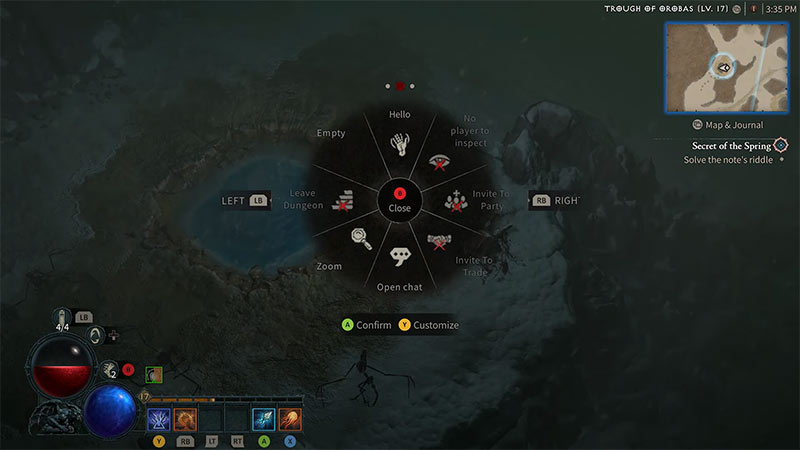
Emote action wheel in Diablo IV
Image Source: Rifle Gaming on Youtube

To use Emotes in Diablo 4, open the action wheel by pressing:

  • E button on the keyboard
  • Up on D-pad

Then, choose the emote and click on it to confirm. At the moment, there are three emote wheels and you can cycle through them with the middle mouse button or control bumpers.

How to Add New Emotes

In Diablo 4, there are certain emotes you’ll have to use constantly. So you can customize the action wheel to add new emotes. To do so:

  1. Open the Action Wheel.
  2. Then, click on the Customize button at the bottom of the wheel.
  3. In the new menu, click on the new emote.
  4. Then, hover over the action wheel’s section where you want to assign the new emote.
  5. Finally, hit the “Save Changes” button to confirm.
  6. You can also click on the “Reset to Defaults” button to undo all changes.

Early on in the game, you will meet an NPC called “Guard Boza” in the “Raising Spirits” side quest. She will ask you to Raise the Spirits of the new militia by giving them a cheer. To do so, head over to the highlighted area on the minimap. Then, add the “Cheer” emote through the customization menu to the action wheel and use it on the militia. You can also check out our video on Raising Spirits for a better understanding.

That’s everything from us on how to Emote in Diablo 4. For more helpful guides like How to Get Fiend Rose, make sure you visit our Diablo IV section.


  • Clean the Squishies Codes (July 2026)

    Clean the Squishies Codes (July 2026)

    Published Date :

    There’s something surprisingly satisfying about picking up the cute Squishies and putting them back on their designated shelves. If you’re interested in getting some unique rewards including free Squishies, this guide is for you. Here’s the complete list of all the working rewards. Last checked for new codes on July 13, 2026 All Clean the… Read More

  • Scratchy Loot Codes (July 2026)

    Scratchy Loot Codes (July 2026)

    Published Date :

    If you want a little luck boost while playing Scratch Loot, codes come to the rescue! In this experience, you scratch cards, reveal symbols, earn coins, and keep upgrading to get better rewards. To make this journey easier, the developers regularly release codes, and if you don’t want to miss out, redeem the freebies mentioned… Read More

  • My Squishy Box Store Codes (July 2026)

    My Squishy Box Store Codes (July 2026)

    Published Date :

    Every new customer brings another opportunity to grow your business and expand your collection of adorable squishies. To help you even more, the devs release My Squishy Box Store codes that provide free cash and in-game items. These freebies that can help you upgrade your shop faster and earn more while handling a steady flow… Read More

  • GTA 6 Players in Australia May Need Age Verification Due to New Online Safety Rules

    GTA 6 Players in Australia May Need Age Verification Due to New Online Safety Rules

    Published Date :

    Australian players could have an extra requirement to meet before accessing Grand Theft Auto VI’s online features. Under the country’s updated online safety regulations, games classified as R18+ may need to verify that players are adults instead of relying on a simple age confirmation (as per news.com.au). If GTA 6 falls under those requirements, Rockstar… Read More







