
Home > Gaming Guides > Upload Custom Logos In WWE 2K23

How To Upload Custom Images In WWE 2K23 (Tutorial Guide)

Updated Date :

With the launch of the new WWE 2K23, players are wondering how to upload custom logos to the game. If you too are one of them then you’re at the right place. The custom logos option featured in 2K22 gave the players an opportunity to showcase their creative side. Players on Youtube and Twitch could add their logos to the superstar attires and give them a personalized look. In this guide, we will tell you how to add logos to the game.

WWE 2K23: How to Upload Custom Logos
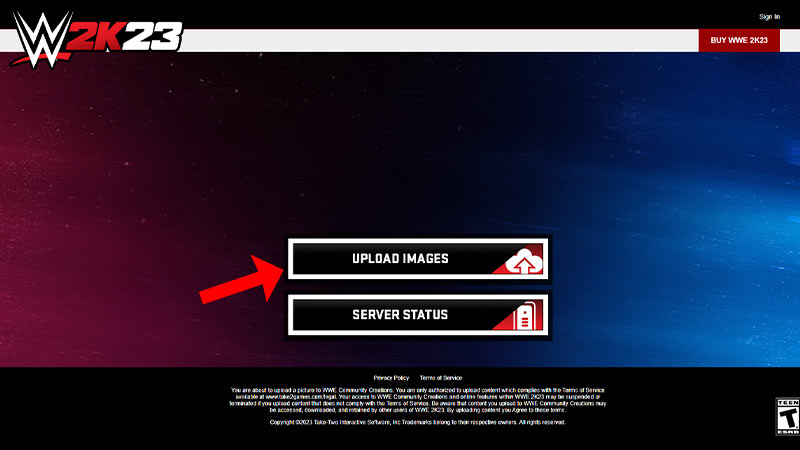
Upload Custom Logos on the Official Website

First of all, make sure you have a stable internet connection before starting the process. If you are playing on a console like the PlayStation or the Xbox, make sure your 2K account is linked to it.

To upload Custom Logos or images in WWE 2K23:

  1. Launch the WWE 2K23 and agree to all the terms and conditions like EULA at the start of the game.
  2. Then, leave the game and go to WWE2K’s official website.
  3. Select the “Upload Images” option.
  4. Then, select the platform you’re playing the game on.
  5. In the new window, sign in to your account. (You can skip this step if you’ve already signed in.)
  6. On the “Upload Images” page, make sure you’ve selected 2K23.
  7. Then, select from a list of dimensions based on your custom logo.
  8. Locate the file and upload it to the site.
  9. Then, wait for the logo to load and hit the “Upload Now” button.
  10. Once you’ve followed these steps, go back to the game.
  11. Then, head over to the Online tab and select “Community Creations”.
  12. Go to “Image Manager” and your logo will be there.

Now, you can download the logo and use it on multiple options like Superstar attires, arenas, championships, and more.

That’s all from us on how to upload Custom Logos in WWE 2K23. While you’re here, make sure you visit our Guides section for more content like How to Drag an Opponent and Locker Codes.

  • CookieRun: Crumble Codes (August 2026)

    CookieRun: Crumble Codes (August 2026)

    Published Date :

    The Devsisters Corporation is back with another Cookie adventure, and like other games, there is a code redemption system in CookieRun: Crumble too! This means we can expect to get regular rewards as drops to help you assemble a team of adorable yet powerful Cookies. Here’s a list of everything currently available. Last checked for… Read More

  • Smiles Codes (August 2026)

    Smiles Codes (August 2026)

    Published Date :

    Smiles is a multiplayer survival mascot horror game where you join other players, complete objectives and survive the dangers lurking in the dark. To make the game more interesting, you can unlock emojis, animations, and more that require in-game currency (Fluff), but it can be quite a grind to earn. Don’t worry, you can redeem… Read More

  • Decaying Winter Codes (August 2026)

    Decaying Winter Codes (August 2026)

    Published Date :

    In Decaying Winter, you’re stranded on EDEN-277 where you need to survive not just scavengers, raiders and supernatural enemies but also the hostile environment. Since it’s a roguelike co-op survival experience, every little boost helps, and that’s where Decaying Winter codes will come in handy. Luckily, there is a code redemption mechanic in the game,… Read More

  • Fishing Tower Defense Codes (August 2026)

    Fishing Tower Defense Codes (August 2026)

    Published Date :

    Fishing Tower Defense codes can help you build a stronger defense by rewarding you with free Diamonds, Dice, and other useful items. Unlike the usual tower defense games, this Roblox experience has you catching unique fish and deploying them as living towers to stop waves of invading humans. As you unlock rarer fish and upgrade… Read More








