
Need for Speed Unbound is now released and is already being enjoyed by a majority of players. It comes with tons of updated and fresh in-game content that is more than enough to keep you entertained for hours. This installment of NFS is a bit unique because of the visual representation of in-game mechanics. What makes it unique from games in the franchise is the effects the game displays while driving. Those who have played this game may already know that trajectory and smoking effects are coming from the rides. While this may feel a bit cool, for some players it becomes annoying because of the cartoonish looks. If you are looking to turn those effects off but are unable to. Read this guide till the end and know how to turn off the driving effects in NFS Unbound.
How to Turn off Effects in NFS Unbound (Explained)
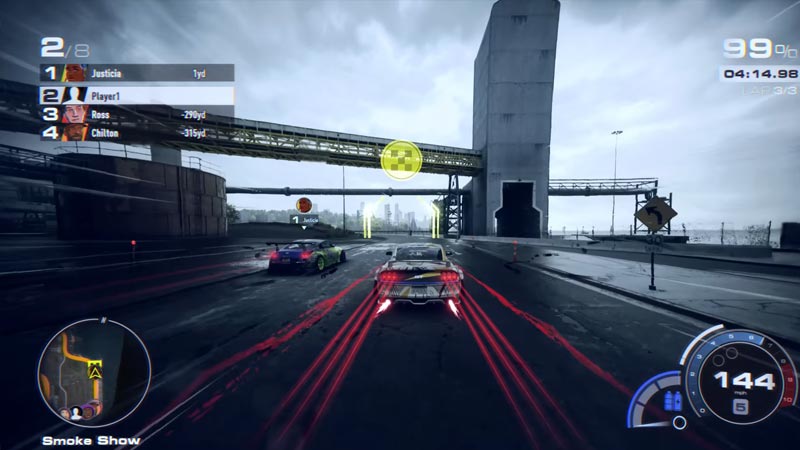
Unfortunately, it is not possible to disable those effects. Earlier, the developers of NFS made a tweet stating that the smoke effects or lights can be turned off. The players then sighed in relief as it was annoying for most of them to experience such changes in the franchise. However, a while ago, it turned out that it is not possible to turn off effects in NFS Unbound. This second statement came from the developer’s Twitter account as well.
Hey guys, #NFSUnbound update from your boy – Basic Tail Smoke and Trail Lights can’t be disabled, everything else can be though 😎 https://t.co/Qj4nGt7fzk
— Need for Speed (@NeedforSpeed) October 11, 2022
Although, you can try the below-mentioned workaround to make the driving effects look less cartoonish.
- Go to the Rides menu and select Styles.
- After that, navigate and enter the Tags section.
- Further, select the Cloaked Tag.
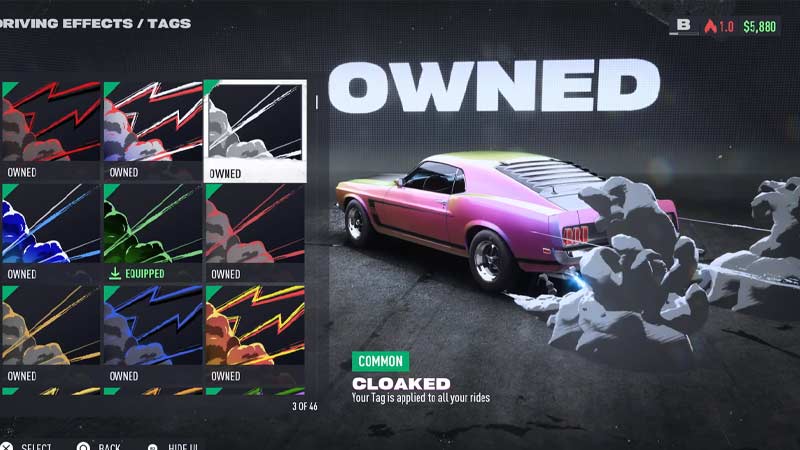
Apart from all the other vibrant tags, the Cloaked tag makes a bit of sense in terms of appearance. It appears as a gray color smoke coming out of the tires when screeched. That’s the best you can do to tackle the cartoonish driving effects in NFS Unbound.
That’s all covered on how to turn off the driving effects in NFS Unbound. If you found this article helpful, then make sure to check out our other gaming guides on Gamer Tweak.











