
In this guide, get all the steps required to disable crossplay in Battlefield 2042. There are many reasons why you would not want to matchmake with those on different platforms. You may want to play with only other console players and avoid PC players or PC players may want to play with only PC players. Whatever be the reason, Xbox players can follow the steps given below to turn off crossplay in BF 2042.
How to Turn off Crossplay in Battlefield (BF) 2042 on Xbox One & Series X/S?
Here’s how to disable crossplay in Battlefield 2042 on Xbox consoles.
- Press the Xbox button on your controller to bring up Xbox guide.
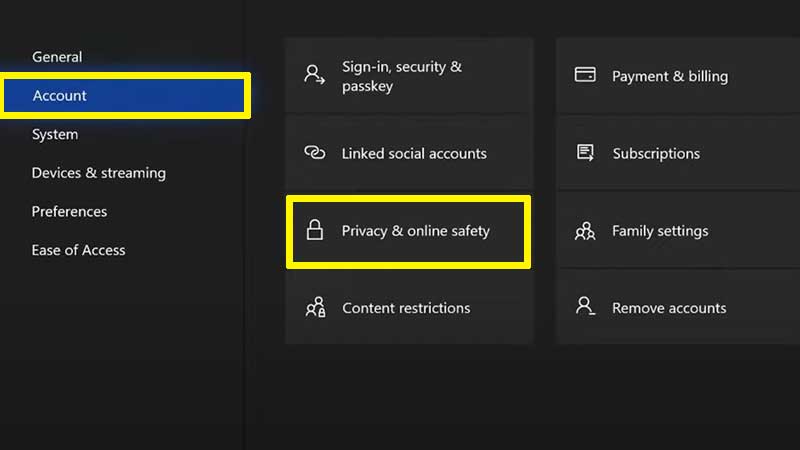
- Go to Settings > Account > Privacy & Online Safety within your profile.
- Select Xbox privacy.
- Select Custom > View Details and Customize.
- Choose Communication & Multiplayer.
- Head to “You can join cross-network play” and switch it from Allow to Block.
This means that this setting also applies to other Xbox multiplayer games you play with crossplay feature available. Yes, that includes COD Warzone, Fortnite, Apex Legends etc. If you want to enable crossplay in other games, you have to follow the same steps and select “Allow”.
Do note that if you were in a party at the time, you can’t change the setting. Leave your party, and you can change the setting. As per multiple Reddit threads, many players are unhappy with this option. Usually, the option to turn off crossplay is right there within a game. There is no need to turn it off entirely from the Xbox settings. But for some reason, that’s the case in BF 2042. The game is, at the time of writing, in the very initial stages of launch. Let’s see if there are any changes related to this in the future.
That’s everything you need to know about turning off BF 2042 crossplay on Xbox consoles. If you are also getting the Unable to Load Persistence Data error/bug in Battlefield 2042, check out the fixes that you can try out for it.











