
Trading Skins or Weapon Camos are one of the most intriguing features of Counter-Strike: Global Offensive. While trading with other players in Steam Community, you get the usual description and prices of the product. But with the help of plugins or extensions like CSGO Trader (Steam Trading Enhancer), we get additional help while trading. So how does it actually work? And who can get access to it? We got you covered with everything in this guide. Here’s everything you should know.
CSGO Trader Plugin is kind of similar to other extensions like CSGO Float & Steam Inventory Helper. All of these CSGO Trader extensions do the same work but the Trader extension has something more to offer. Know about it below.
CSGO Trader Plugin – Key Features & Benefits
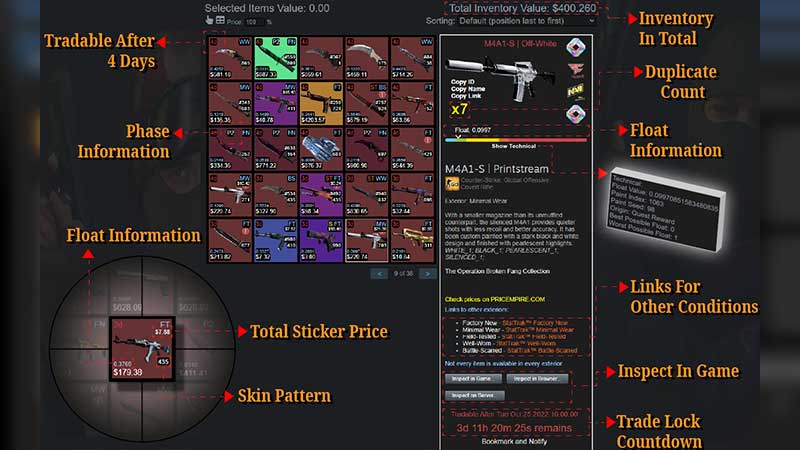
When you install the CSGO Trader Extension, you get more helpful information related to the trade. For instance, if you come across a scammer, then this plugin will mark it for you. Other key features include:
- Phase Information of the Product (Weapon)
- Float Information (wear condition whose value varies between 0-1)
- Loss or Profit Rate for the Trade
- Sorting Items with multiple filters
- Duplicate Count
- Separate Slot for adding or removing multiple items for Trade
- Informs about a Product’s Trade Lock Expiration by putting a countdown
This is just a gist of what’s coming your way if you install the CSGO Trader Plugin. You can head to the CSGO Trader website to get a detailed information about its features.
How to Get & Use the CSGO Trader Plugin
CSGO Trader Plugin or Extension can be downloaded from the respective Extension Shop of your Web Browser. If you are using Google Chrome then head to the Chrome Web Store to get it. Alternatively, Edge users can get it from Microsoft Edge Addons & Firefox users can use their Browser Add-ons. Moreover, you can get it on other browsers such as Opera, Brave, etc through the Chrome Web Store.
Once you have the extension installed, enable it on the Steam Community Market to see all the additional data on the screen.
Note – Unofficial 3rd party software or plugins can somehow cause harm to your PC. We do not promote such software, so make sure to use the CSGO Trader Plugin at your own risk.
That’s pretty much it about this Steam Trading Enhancer Plugin. If you are a passionate CSGO player, then we have a lot of such helpful contents right here on Gamer Tweak. Make sure to check it out.











