Knowing how to teleport in Minecraft can be helpful so players are looking for ways to do it on PS4. The world of Minecraft is ginormous and filled with a plethora of materials. By collecting these materials, you can craft new tools, weapons, armor, and more. Moreover, you can also build structures like a house, towers, castles, farms, and more. In order to gather materials quickly, it’s best if you play with your friends and explore the vast lands. As you are exploring, imagine if you or your friend comes across a mine full of rare resources like Diamonds. How do you reach it as fast as possible? This guide will help you to do it.
How to Teleport in Minecraft PS4 (Using Commands & Coordinates)
Now, Minecraft allows teleporting with the help of an Ender Pearl but, it’s a hassle finding it. Moreover, it’s consumed once you use it. The better way is to use cheats and commands.
To teleport in Minecraft PS4:
- Go to the Menu and select Settings.
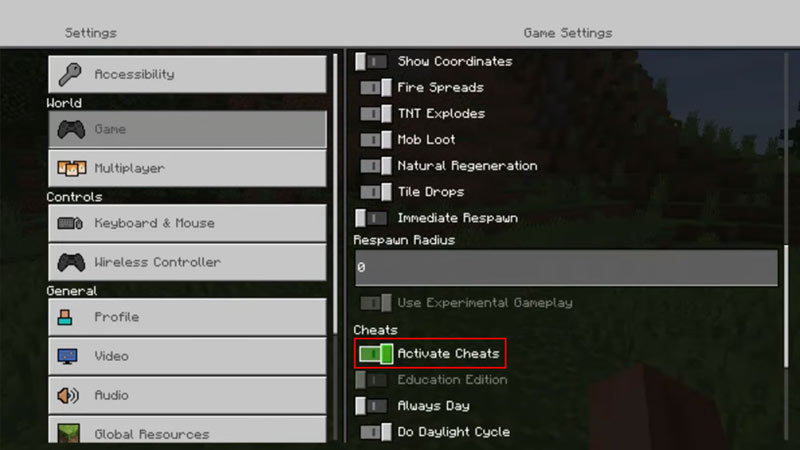
- Now navigate all the way down in the Game tab until you find Activate Cheats and turn it On.
- Go to your chat or command box by pressing the Right D-Pad button on your controller.
- In the new window, navigate to the “/ symbol” and select it.
- Then, select Teleport > Who > player you want to teleport > Where > player you want to teleport to.
- You can also use this method to teleport yourself to another player. Just select your account under the “Who” tab and another player’s account under the “Where” tab and you will warp to their location.
- To teleport using commands:
- Teleport to a friend: Type /tp YourName Friend’sName (E.g. /tp brockS Mater)
- Teleport a friend to you: Type /tp Friend’sName YourName (E.g. /tp Mater brockS)
- Teleport to Specific Coordinates: Type /tp YourName Coordinates (E.g. /tp brockS 40 58 67)
That’s everything you should know on how to teleport in Minecraft PS4. For more helpful guides like How to Make Netherite Armor, make sure you visit our Minecraft section.