
Just like other classes can swap weapons or use enchantments, the Necromaniacs have the Book of the Dead. With the help of this book, they can summon Skeletal Warriors, Skeletal Mages and even Golems. If you belong to this particular class, then we will show you how to summon Golems as a Necromancer in Diablo 4.
How to Summon Golems as a Necromancer in Diablo 4
If you want to summon Golems as a Necromancer in Diablo 4, then you will need to reach level 25 first and also complete the Necromancer: Call of the Underworld quest. You will have to complete the following objectives of the quest:
- Find the Shrine of Rathma
- Collect 12 Unbroken Bones
- Find the Bitter Cave to collect the Vile Artifact
- Fill the Jar of Souls
How to Find the Shrine of Rathma in Diablo 4
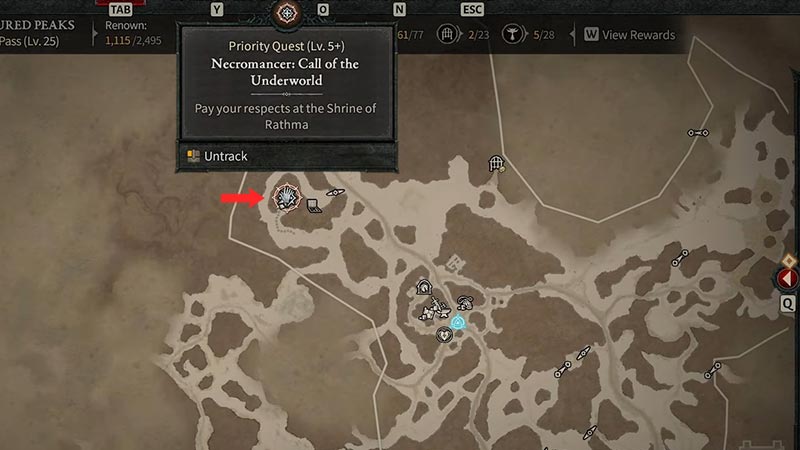
The Shrine of Rathma is located just northwest of Menestad and also directly north of the Altar of Lilith. Once you reach the shrine, you will see an NPC called Maltorius. After interacting with the Shrine, you will be given a task – collect 12 Unbroken bones. Don’t worry as the enemies who contain these will spawn in the same area. After collecting all 12, head
to Maltorius again. He will now ask you to retrieve a vile artifact now that will spawn nearby inside a cave.
How to Find the Bitter Cave
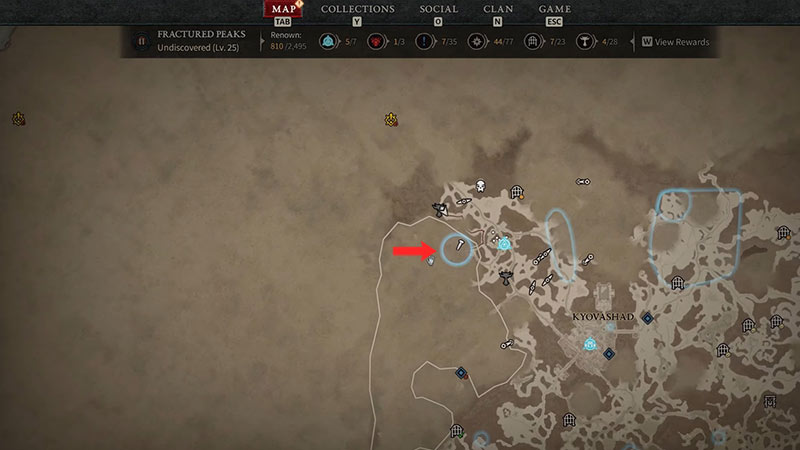
You will find the vile artifact inside a Bitter cave. The Bitter cave is located northwest of Kyovashad. Once you reach the Bitter cave, you will be faced with your next objective – Open and fill the Jar of Souls.
Fill the Jar of Souls
You will need to fill the Jar of Sols if you want to power up your Golem. Fortunately, that is easy as you will only need to find enough enemies nearby. Once the Jar of Souls is filled completely, you will need to speak to Maltorius again. You will now receive your Golem as a reward for completing the Necromancer: Call of the Underworld quest. Go ahead and use your strongest ally to spread destruction on your enemies!
Here’s a video that showcases all three types of Golems:
That’s all you need to know about how to summon Golems as a Necromancer in Diablo 4. We hope that this guide was helpful. For more things related to the game, head to our dedicated Diablo 4 section on Gamer Tweak.











