
Home > Steam Guides > How To Stop Steam From Launching On PC Startup

How To Stop Steam From Launching On PC Startup

Published Date :

To stop Steam from opening on startup, you will have to disable the launch setting directly from the Steam Client, and this guide has the steps you will need. Although most settings in Steam are fairly simple, the platform’s lack of instructions is one reason why players get confused.

Steam is, without any doubt, one of the most popular platforms for gaming, but players are often annoyed by the Steam Client popping up every time they start their PC. Fortunately, a few tweaks in the settings and players will ensure that the Steam Client only launches when they choose to make it launch.
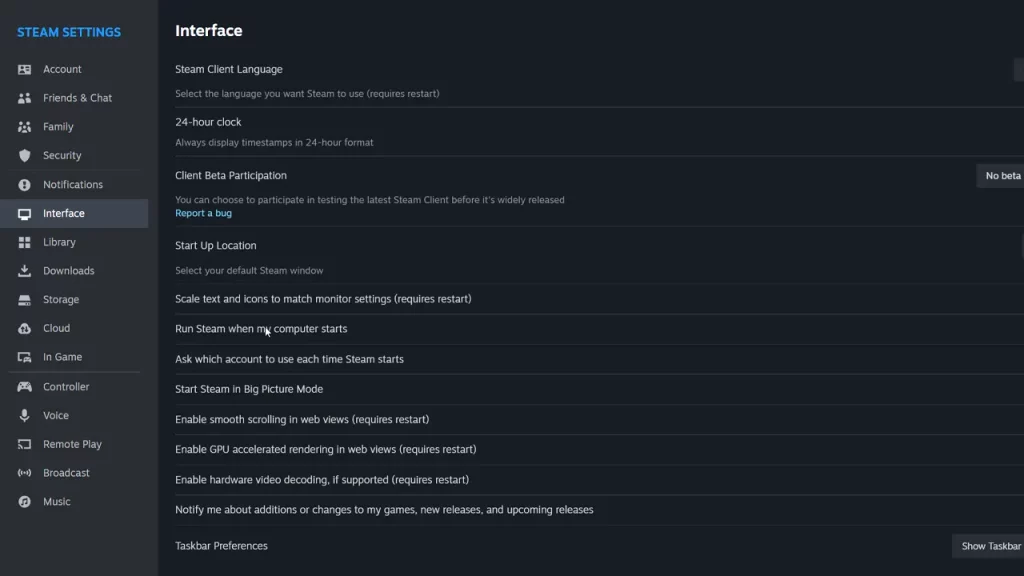
How to Stop Steam from Opening on Startup
Image via Steam

How to Stop Steam from Opening on Startup

Although it is certainly annoying that it pops up, that is how the platform always works. Since you are looking to stop Steam from opening on startup, these are the steps that you need to follow:

  1. Launch Steam Client and then select Steam from the top left corner of the screen.
  2. Now, select Settings and then look for the Interface option from the left.
  3. From the options that appear, look for the option that reads ‘Run Steam when my computer starts’.
  4. Once you find this option, toggle it Off and Steam won’t launch without players starting it up.

Steam Client automatically updates when players launch the platform or when it opens on startup. However, if you stop Steam from opening on startup, the platform won’t update automatically. Nevertheless, you can still launch it and wait for the update to happen. If you are facing any more issues in Steam, our dedicated section has more guides for you right here at Gamer Tweak.


  • Anime Duelists Codes (July 2026)

    Anime Duelists Codes (July 2026)

    Published Date :

    Anime Duelists follows the tried and tested formula of spinning stars to unlock fighters, sending them into battle and collecting rewards. If you want to get unique fighters, abilities, and progress through various realms, you need these code rewards! You can get anything from free Gems, Trait Rerolls, Stats Reroll, Super Luck, Star Speed potion,… Read More

  • Mini Cup Codes (July 2026)

    Mini Cup Codes (July 2026)

    Published Date :

    In Mini Cup, you open up packs to unlock footballers, build houses, and win matches against rival teams. This makes it a perfect mix of some of the most popular gameplay loops for soccer fans on Roblox. To grow your club, you’ll need cash, as well as special packs, which is where Mini Cup codes… Read More

  • Be The Final Boss Codes (July 2026)

    Be The Final Boss Codes (July 2026)

    Published Date :

    Now you can be the final boss! In this experience, you summon minions to fight for you and take down waves of heroes. To level up, you’ll need plenty of coins and various resources, which is where Be The Final Boss codes come in handy. If you wish to boost your character and stay one… Read More

  • Clean the Squishies Codes (July 2026)

    Clean the Squishies Codes (July 2026)

    Published Date :

    There’s something surprisingly satisfying about picking up the cute Squishies and putting them back on their designated shelves. If you’re interested in getting some unique rewards including free Squishies, this guide is for you. Here’s the complete list of all the working rewards. Last checked for new codes on July 13, 2026 All Clean the… Read More






