Is your Steam Deck stuck on the Logo screen? Have you tried waiting for hours but your device still refuses to budge? We know that this can be quite frustrating if you want to sit back and use your Steam Deck after a long and tiring day. If you’re encountering this error and don’t know what to do next, then this guide is the one for you.
How To Fix Steam Deck Stuck On Logo
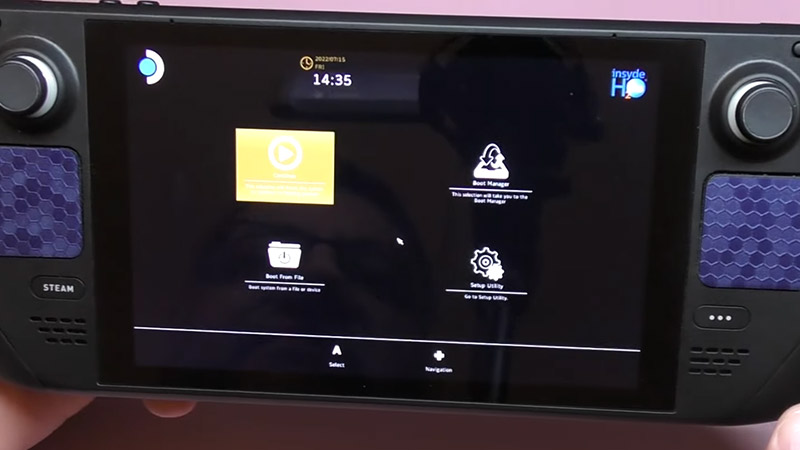
Mentioned below are all the possible methods that you can use to fix your Steam Deck stuck on logo, loading or boot screen. Without further ado, let’s get started:
Enable Battery Storage in BIOS Mode
This method is actually the best way to fix the Steam Deck stuck on logo problem. However, it is quite tricky as you will have to enter the Safe mode on Steam Deck. Follow the steps below to get this done easily:
- To boot up the BIOS mode, just press the “Volume up” and “Power button” on your Steam Deck together. Make sure to unplug your charger.
- Now, once the Safe mode is booted up, go to “Setup Utility”.
- Next, head to “Power Menu” and then select “Battery Storage Mode”.
- Press “Confirm” and your Steam Deck will shut down completely.
- Finally, plug the charger back in and then turn on your Steam Deck.
Your Steam Deck will no longer be stuck at the logo screen with the help of this method. However, if it still doesn’t budge then try out our next fix:
Rollback to a Previous Update
Sometimes, new updates bring in bugs instead of solving them. This can affect several users and cause the Steam Deck stuck on logo error. So, if you have started noticing this right after the update then it’s time that you rollback to an older one. Here’s how to do it:
- Bring up the BIOS mode of your Steam Deck by holding down the “Power button” and “Volume up” button together.
- Now, head to “Boot Manager”.
- From here, you will need to navigate to Steam OS.
- Finally, choose the “Previous” option to get the earlier update installed in your Steam Deck. If that still doesn’t fix the problem, then check out our last solution.
Force Restart your Steam Deck
If your device is stuck on the loading screen, chances are that it is having a freezing issue. This might be causing the loading screen error for you in Steam Deck. In such times, getting your device booted up again often does the trick. Since you will have no control over the Steam Deck display, you will need to manually restart it.
All that you will need to do here is hold the power button down for three seconds. If it doesn’t switch off, there may be an OS-level issue. In that case, hold the power button down for a full 10 seconds. Turn on your Steam Deck again to see if the error persists. If yes, then raise a complaint with Steam Support describing your issue.
That’s all you need to know on how to fix the Steam Deck stuck on logo error. We hope that you managed to solve this annoying problem. While you’re still here, don’t forget to check out the best Steam Deck games of 2023 right here on Gamer Tweak.