Modern Warfare 2 is the new era of Call of Duty. With a Global Campaign, Multiplayer mode, and Special Ops, MW 2 features the return of the iconic Task Force 141. And along with that, the return of iconic characters like Soap Mactavish, Captain Price, and even Ghost is imminent. If you have played COD Warzone, you are already aware of the Slide Cancel. Even if you are new to this, it is not hard to decode it. You can slide your way across the battlefield. Since many players are confused about the mechanics and controls of this, we have made this guide. So let’s check it out and see how to Slide Cancel in COD MW2.
How to Enable Slide Cancelling in Modern Warfare 2
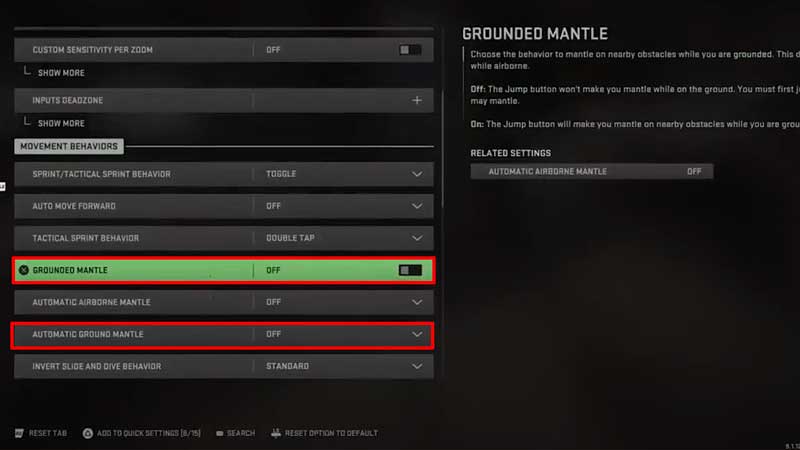
Slide Cancel is one of the best moves in an open field to get to cover or change position and fire. In Modern Warfare 2, Slide Cancel is a far better game mechanism compared to other COD games. There are a few settings that you need to make in your game before you can Slide Cancel. Here’s how to enable Slide Cancelling in Modern Warfare 2:
- From your Main Menu, head over to Settings and then select Controller.
- After that, scroll down to Gameplay and then set the Automatic Sprint to Automatic Tactical Sprint.
- Next, head below to Weapon Mount Activation and select Double-Tap ADS.
- After this is out of the way, press R1 or RB to head over to Advanced Settings and then toggle to Grounded Mantle. Make Sure that this is Off.
- Lastly, set the Automatic Ground Mantle to Off as well. After this, you will be able to Slide Cancel in Modern Warfare 2.
How to Slide Cancel in COD MW2
Now that the settings required are enabled, it is time to Slide Cancel. The mechanism makes it a lot easy to avoid damage inflicted on the battlefield. Here’s how to Slide Cancel in COD Modern Warfare 2:
- Sprint using your left Analog stick and then press the button for Slide Cancel.
- For PS Users: Press O
- For Xbox Users: Press B
- For PC Users: Press C
- After that, Jump.
That’s all there is on how to Slide Cancel in COD Modern Warfare 2. While you are here, check out Modern Warfare 2 for more guides with Gamer Tweak.