The Elder Scrolls V: Skyrim was released back in 2011 but is still relevant even to this day. One of the core reasons is due to the availability of various mods. The
Skyrim Script Extender or SKSE is a tool used in many mods that gives you better scripting capabilities and also additional functionality to the game. But many users have reported that they are encountering the “SKSE Plugin loader DLL failed” error while playing Skyrim. This guide will aim to provide you with a solution.
How to Fix SKSE DLL Plugin Loader Failed
The “SKSE Plugin loader DLL failed” error can occur due to a host of reasons. The fault could be in your DLL plugin loader or the SKSE tool itself. Here are steps to find out and fix this annoying error.
Downgrade to a Previous Version
Downgrading the game is a little complicated. We will advise that you take this option only if you know what you are doing. For this, you will need to have the current version of Skyrim that is 1.6.640.0. This is what you will have to do:
- Head over to Nexus Mods
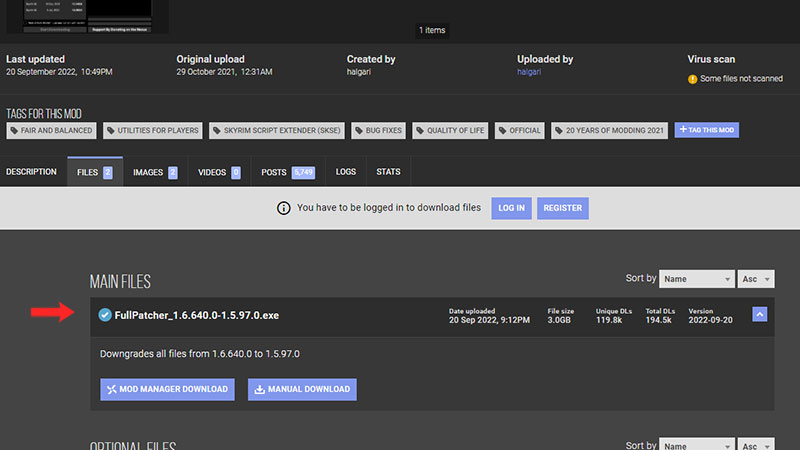
- On the Skyrim Special Edition mods page, download the “Skyrim Special Edition Downgrade Patcher”
- Follow all the instructions and FAQs to ensure there’s no hassle.
This method will revert your game to a previous version where the mods and DLL plugin loader are known to work without any fuss.
Install the Address Library
This is for those who haven’t already installed the Address library for Skyrim. There is a dedicated tool for SKSE specifically. For newer versions of the SKSE, you would need to download the Address Library from Nexus Mods. This should most likely fix your “SKSE DLL plugin loader failed” error.
Updating Mod Organizer 2
The last method is to update MO2 (Mod Organizer 2). If you have the tool already, ensure that it is updated to the latest version. You can head over to Nexus Mods and search for Mod Organiser 2. Check if it’s the latest version and hit on ‘install’.
That is pretty much all you can do to fix the “SKSE Plugin loader DLL failed” error in Skyrim. For more tips and tricks, head over to our Skyrim page.