Home > Cities Skylines 2 > Cities Skylines 2 Shadow Flickering Fix

Cities Skylines 2 Shadow Flickering Fix

Published Date :

Wondering how to fix the Shadow Flickering issues in Cities Skylines 2? In this guide, we have mentioned a few effective ways to get rid of this issue. But before trying out the solutions, ensure that your rig is capable enough to deal with the game’s requirements.

Aside from shadow flickering in CS2, you can also experience poor in-game video quality. For that problem, we have covered a guide on the Best Graphics Settings that you can check out.

How to Fix Shadow Flickering in Cities Skylines 2

For your reference, here are the minimum system requirements for running Cities Skylines 2 on PC:

  • Requires a 64-bit processor and operating system
  • OS: Windows® 10 Home 64 Bit
  • Processor: Intel® Core™ i7-6700K | AMD® Ryzen™ 5 2600X
  • Memory: 8 GB RAM
  • Graphics: Nvidia® GeForce™ GTX 970 (4 GB) | AMD® Radeon™ RX 480 (8 GB)
  • Storage: 60 GB available space

If your system does not meet the above system requirement, then use these solutions to fix Shadow Flickering in Cities Skylines 2:

Switch Anti Aliasing to TAA

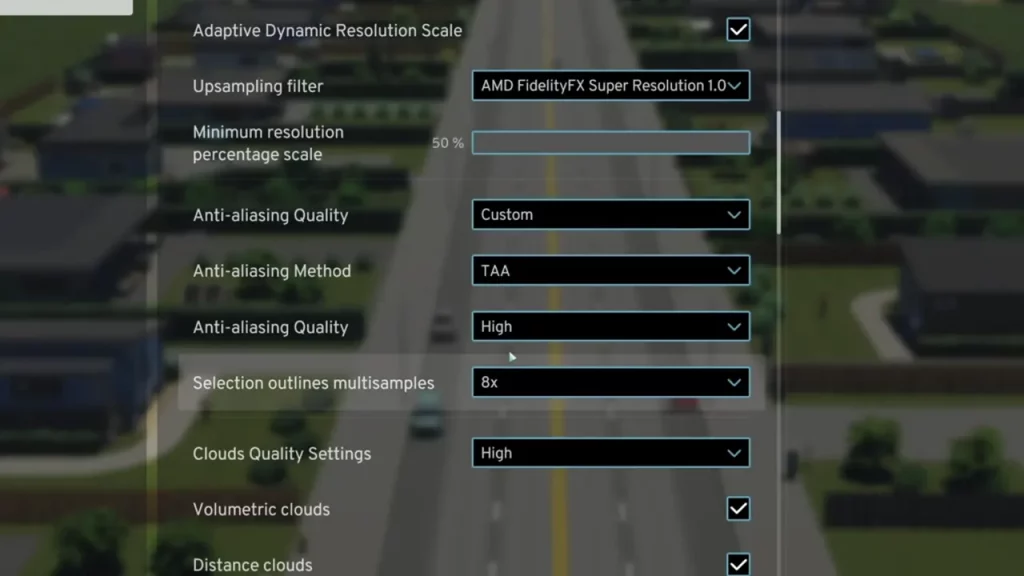
First up, you should switch the Anti-Aliasing from the default setting to TAA. Here’s how you can do so:

  • Head over to Options > Graphics while in-game.
  • After that, enter the Advanced tab and navigate to Anti Aliasing Method.
  • Toggle this option to TAA.
Cities Skylines 2 Shadow Flickering Fix
Image Source: TactiCat

This should fix the shadow flickering issues in Cities Skylines 2. In case it doesn’t, then use the other solution to fix the issue.

Change Dynamic Resolution Scale Quality

In the Graphics menu, make sure to switch the Dynamic Resolution Scale Quality to Constant. Doing so will improve the pixels rendered by your rig and help you maintain better video quality.

Reinstall Cities Skylines 2

If none of the above works then you should try and reinstall the entire game again. Since this process will take lots of time, you should use it as your last resort.

That’s all you can do to fix the Shadow Flickering issues in Cities Skylines 2. For more such content, be sure to check out our dedicated section for Cities Skylines 2 Guides on Gamer Tweak.


  • Steal an Egg Codes (September 2026)

    Steal an Egg Codes (September 2026)

    Published Date :

    Steal An Egg is a Roblox game where you steal eggs from creatures, hatch them, and build a collection of pets. As you progress, you can also improve your base and race through different areas as you work toward rarer pets. Speaking of progression, many players are looking for Steal An Egg codes that can… Read More

  • Silk Road Trading Simulator Codes (September 2026)

    Silk Road Trading Simulator Codes (September 2026)

    Published Date :

    Silk Road Trading Simulator is a Roblox game where you take on the role of a merchant and travel between historic locations while trading goods. You can build your wealth, expand your trading operation, and customize your character along the way. Codes can give you free items, including cosmetics for your merchant. Here’s the complete… Read More

  • How to Play NoPixel V

    How to Play NoPixel V

    Published Date :

    NoPixel V is the newest version of the famous GTA 5 roleplay experience, and this time Rockstar Games is officially supporting the project. It comes with a complete rebuild of the server, new locations, updated visuals, and more tools for creating roleplay stories. However, the September launch is not an open release. Here’s what you… Read More

  • GTA 6 Sprint Control Change: Rockstar Ditches Button Mashing?

    GTA 6 Sprint Control Change: Rockstar Ditches Button Mashing?

    Published Date :

    Rockstar is making a small but important change to how players sprint in GTA 6. The new instalment appears to be moving away from the button-mashing controls used in earlier GTA titles and switching sprinting to the left stick. This means running around Vice City should require fewer repeated button presses when playing as Jason… Read More