Many Players are looking for the locations of the Seven Outpost in Fortnite. These outposts are crucial for the resistance challenges. And one such challenge is to establish a device uplink near a seven outpost. But finding them all over the map can be tedious and tiresome, not to mention a bit time-consuming. So in this guide let us check all Seven Outpost locations in Fortnite & how to establish a device uplink near it.
All Seven Outpost Locations in Fortnite
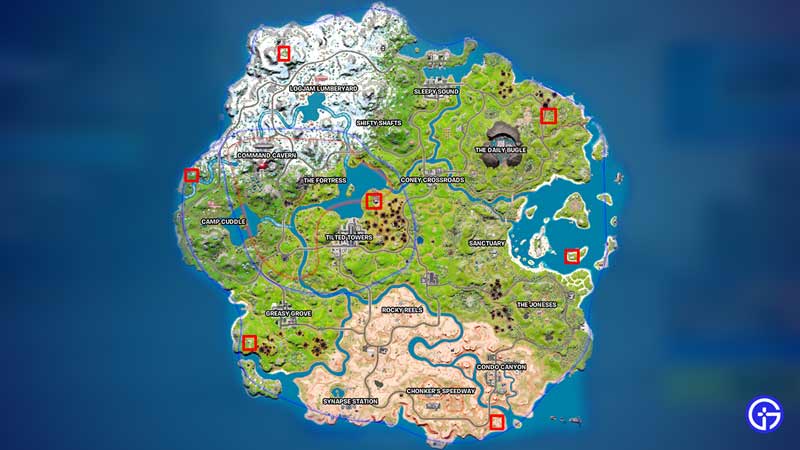
These are the locations of all 7 outposts in Fortnite.
- Camp Cuddle: Go northwest from Camp Cuddle, you can also reach there by going southwest from Command Cavern. You will find an Outpost near the stream of water.
- Logjam Lumberyard: Head northwest from Logjam Lumberyard and you will find the outpost in the hilly region.
- Greasy Grove: Go southwest from Greasy Grove. This outpost is located near the edge of the island.
- Chonker’s Speedway: Go southeast from Chonker’s Speedway to reach this outpost. You can also head directly south from Condo Canyon to get there. This outpost too is located near the edge of the island.
- The Joneses: Northeast from The Joneses you will see three small islands. Go to the smallest island on the bottom right. You will find an outpost here.
- Tilted towers: Go northeast from Tilted towers or southwest from Coney Crossroads. You can find an outpost here between these two locations near the water body.
- The Daily Bugle: You can find the last outpost by going northeast from The Daily Bugle. This outpost is located near the edge of the island but not too close to the edge.
You can check the above image for the locations of each Outpost.
How to complete Establish a Device Uplink near a Seven Outpost
Completing this mission is super easy. Especially since you now know the locations of all outposts mentioned above. To complete this mission.
- Go to any of the above seven outpost locations except for the one near Tilted towers.
- Once you reach the outpost you will see a blue hologram with a network icon.
- Pass through it and it will establish the device uplink.
- Now, all you have to do is visit two other outposts.
- After you visit both the locations you will complete some resistance challenges.
That covers this guide on the Seven Outpost locations in Fortnite and how to Establish a Device Uplink near it. Since you like playing this game be sure to check out our other Fortnite guides to get help on more such topics.