
For any online game, having a well-functioning Server is a must. Although, a server cannot be running at optimal capacity at all times. Also due to any updates that occur in the game, servers will go down. Say that you want to play Fortnite, but the servers are having an issue. They have been down for a while now. There should be a way to check if they are working or not, right? In this guide, I am going to show you how to check the Server Status in Fortnite.
Are Fortnite Servers Down? How to Check the Server Status Downtime in Fortnite
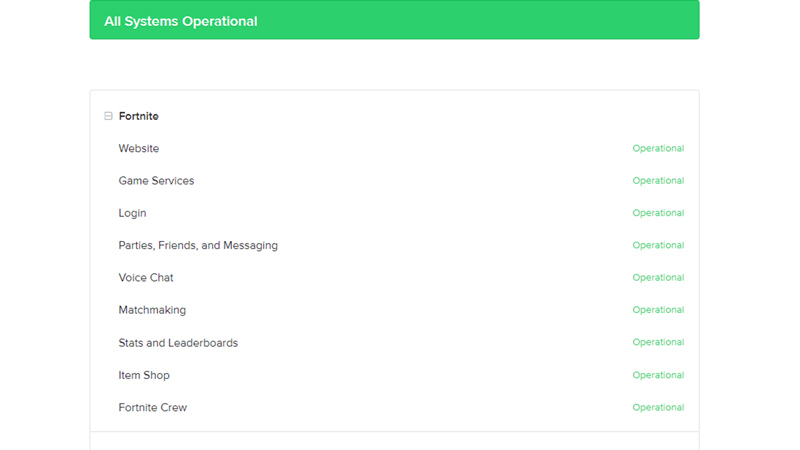
To check the Server Status in Fortnite, you will have to go to this Epic Games Website. Here you will be able to check The Server Status for servers that are under Epic Games, one of them being Fortnite. Under Fortnite, all of the servers that support the game are listed. On the right of every server, their status is given. It will either be Operational in green or Maintenance in yellow. If the Servers are under Maintenance, then you will have to wait till the Servers are fixed. But if it’s in Operational, then you will have to check if your connection to Fortnite is proper or not.
If you cannot connect to Fortnite’s servers, you have to check if your Internet connection is stable. If that’s not the case then check if any of the game files are corrupt. You can fix this by uninstalling and reinstalling Fortnite.
Servers go down every so often as Fortnite runs server maintenances to ensure that servers run well. They perform maintenance to ensure that their newer updates run well with the game. They can even go down if the Server faces a severe issue. These are common occurrences that ensure the Fortnite Servers function correctly. Keep an eye on the official Twitter account for any updates and recent information.
This was how you can check Fortnite’s Server Status. Hopefully, this guide helped you in resolving your doubts. For more help with Fortnite, check out our guides on Gamer Tweak!










