Battlefield 2042 was introduced with a lot of bugs and issues. Alongside those issues were certain features that were either removed or were absent from the beginning. Although DICE has stated that they will be fixing all of the bugs and errors, so we will have to wait till they do so. In the meantime, we will discuss the issue that many players have experienced. The Screen Cut Off Issue in Battlefield 2042 is a very annoying one as the player cannot see certain parts of the game on their screen. In today’s article, I will show you how to fix the Screen Cut Off Issue in Battlefield 2042 as well as how to change your Screen Size.
How to Fix the Screen Cut Off Issue in Battlefield 2042
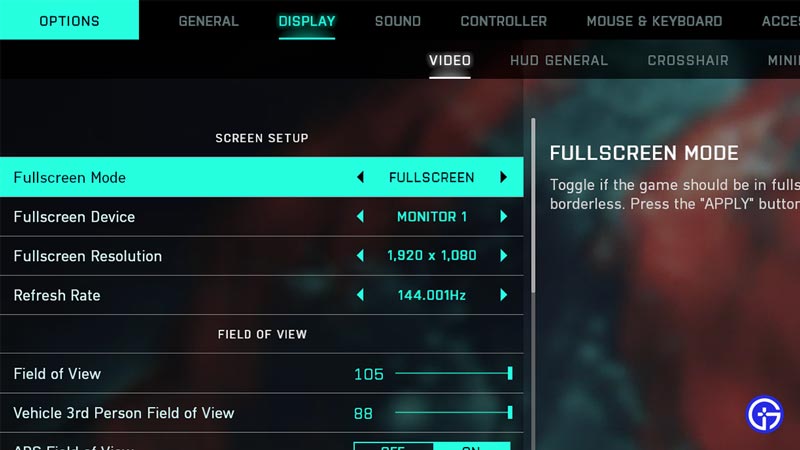
So, to explain it in brief the Screen Cut Off Issue in Battlefield 2042 is where the player cannot see parts of the game on their screen. The game is very zoomed in and stretched. This is very bad, visibility in any game is very important and the screen cut off issue hampers that. This issue in Battlefield 2042 is more prominent on consoles but PC players can also benefit from this article. The solution to this issue is by adjusting the Screen Resolution in the Game Settings. Players have reported that the screen cut off issue was fixed after performing these fixes, so try the fixes below as they could end up solving the problem. Also, they won’t harm any setting or resource in Battlefield 2042 or on your system.
How to Adjust Screen Size in BF 2042
To adjust the Screen Size in Battlefield 2042 you must:
- PS:
- Go to the PS Home Screen.
- Open up the Settings Menu.
- Search and Click on the Sound and Screen option on the PS4 or the Screen and Video option on the PS5.
- Open up the Display Area Settings for the PS4 or Screen Settings for the PS5.
- For the PS4, change your display settings to FULLSCREEN on Fullscreen mode, set your Fullscreen Resolution at your Monitors Resolution.
- For PS5, you will need to open Adjust Display Area and apply similar changes.
- Xbox:
- Press the Xbox button to open up your Options Menu.
- Go to your Profile, select System, and then choose Settings.
- Go to your display settings and search until you find the option to change your resolution.
- Now change your screen resolution from 4K UHD to 1080p and then set it back to 4K UHD.
The equivalent for PC players would be to go to the settings menu and apply similar settings to change their screen size for Battlefield 2042. This was all about fixing the Screen Cut Off Issue in Battlefield 2042. Hopefully, this guide has helped you in fixing the issue. For more BF 2042 coverage, stick with Gamer Tweak!