There is a new feature that can help you level up your Roblox experience and that is the Sandbox Roblox extension. It’s in RoPro and when you use it, you will be able to check out items before you buy them for your avatar. Players can get quite a lot of features that are not available in the main app yet. Here’s is how to download and get it.
Sandbox Roblox Extension – What is it?
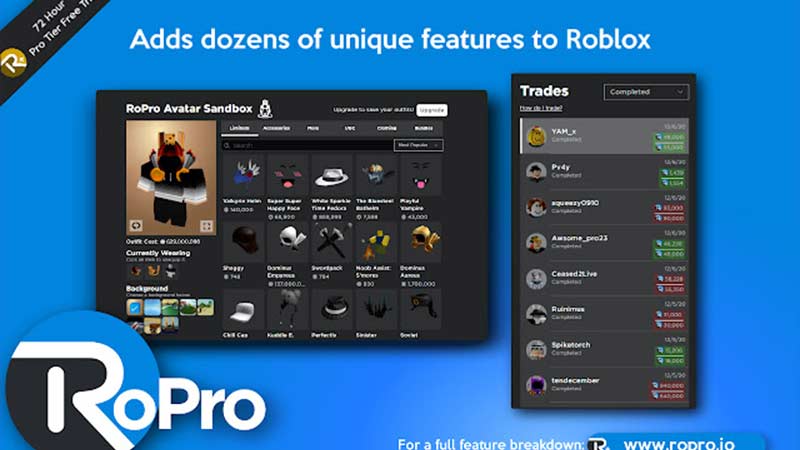
‘Sandbox Roblox Extension’ is a part of RoPro extension’s update where you get the Avatar Sandbox. With it, you can make an avatar with whichever items you want despite not buying them. So, you can try out things and make your avatar look as you wish without spending a single penny. Once you have decided on something, you can proceed to buy the cosmetic items. Think of it like trying on things in the trial room – it works just like that.
This will surely help you be sure about a certain item you were planning on buying before spending money. You also have a lower chance of regretting buying something. It’s perfect for those who like to switch up their character often.
How to Download RoPro Avatar Sandbox Extension?
Players can get the Sandbox Roblox extension by downloading the RoPro Chrome plugin on your browser. It’s also available as a Firefox add-on. With that done and installed, you can get the benefits when you open your Roblox client.
Do remember that doing this has its own risks so be careful. If you are sure you want to use this then you will be able to check out multiple outfits at the same time. When you are convinced, you can go ahead with your purchase.
How to Uninstall RoPro Plugin?
Tried out this extension but it’s not your cup of tea? Find out how to uninstall the RoPro plugin here:
- Open up Google Chrome/Firefox.
- Click on the Extensions icon which should look like a puzzle piece.
- Click on the three dots next to the name.
- Go ahead and click on Remove from Chrome.
This will remove the Sandbox Roblox Extension. And that’s all there is to it. If you want some freebies in the games you are playing, check out our Roblox Game Codes list on Gamer Tweak.