Home > Gaming Guides > How To Get ‘Rush E’ On Beat Saber

How To Get ‘Rush E’ On Beat Saber

Published Date :

While Beat Saber has some of the most popular tracks of all time, it’s somehow not quite enough for the fans. This is understandable as everyone’s music tastes change with time. But thanks to the Modding community, you can now add custom songs to this VR Game.

Speaking of it, Rush E is one of the most sought-after songs players want to have on Beat Saber. And the only way to get it is by taking help from Mods and other third-party software.

Here’s How to Get Rush E on Beat Saber

  • First of all, get to a PC and download SideQuest on it. You will need this to get the custom songs loaded on Beat Saber.
  • Once you have downloaded SideQuest on your PC, install it right away.
  • Now, head over to the Oculus Quest app on your device and toggle on the Developer Mode.
  • Restart your Oculus Quest so that the changes can take place.
How To Get 'Rush E' On Beat Saber
Image Source: Digital Cynics (YouTube)
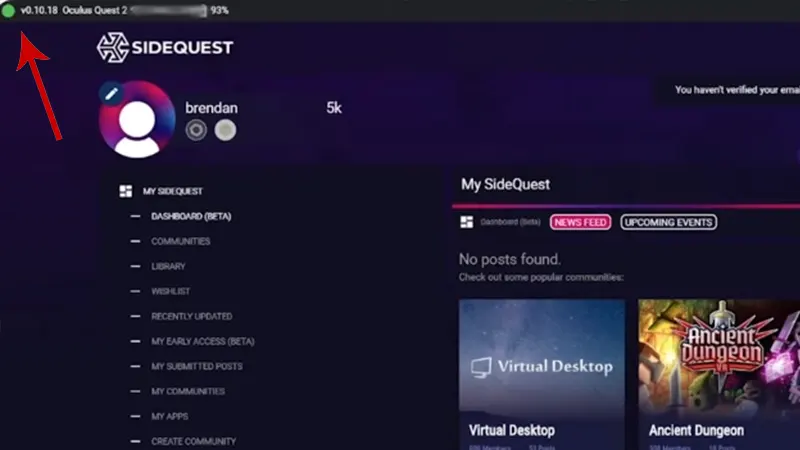
  • Your next step should be connecting your PC with the Oculus Quest with a cable. After connecting, a green dot saying your Oculus is connected will appear.
  • On your PC, use the Internet to download BMBF, a modding solution for Beat Saber.
  • Once BMBF is downloaded, drag and drop the downloaded file to the green dot on the SideQuest app.
  • This process is completed after it says ‘All Tasks Completed.’
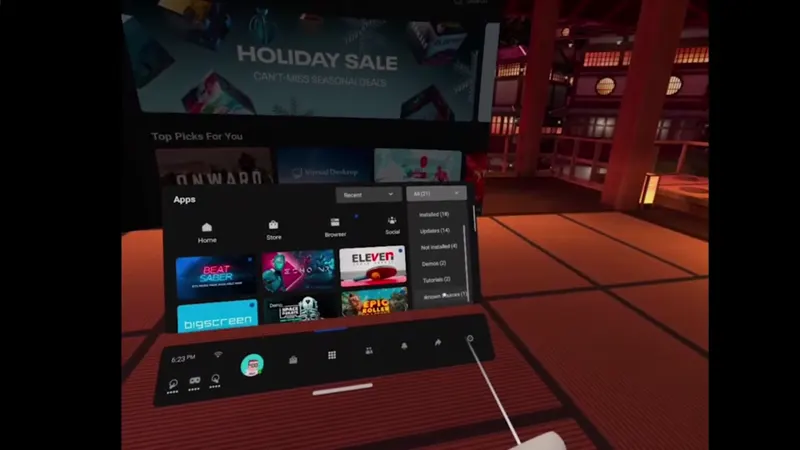
How To Get 'Rush E' On Beat Saber
  • Next, head over to your Oculus Quest and navigate to Apps > Unknown Sources.
  • From there, you will be able to load the BMBF on the Oculus Quest.

After you are done with the installation part, head over to the Internet and set up a BeatSync account. It is needed for searching custom songs like Rush E on Beat Saber.

That is it, you can now launch the modded Beat Saber on VR > select Rush E via BMBF > Sync it to Beat Saber.

That is everything you can do to get Rush E on Beat Saber. For more content like this, feel free to check out our dedicated section for Beat Saber Guides on Gamer Tweak.
  • +1 Speed Evolve Codes (July 2026)

    +1 Speed Evolve Codes (July 2026)

    Published Date :

    Speed-based games on Roblox will always stay popular, and this particular experience is quite addictive! Here, you play as an animal and your goal is to evolve into stronger animals, unlock new worlds, and be the fastest player on the server! +1 Speed Evolve codes offer free Speed and Win Boosts that can make your… Read More

  • Yeet a Brainrot Codes (July 2026)

    Yeet a Brainrot Codes (July 2026)

    Published Date :

    If you’re annoyed at the Brainrot trend, this is your opportunity to “yeet” them into the distance! To launch Brainrots farther, you need better pets, potions, and more rewards, and thankfully, these Yeet a Brainrot codes will come to the rescue. You can easily unlock various Divine Relic Chests, Primeval Relic Chests, Coin/Luck/Power potions, exclusive… Read More

  • Build A Soccer Squad Codes (July 2026)

    Build A Soccer Squad Codes (July 2026)

    Published Date :

    To build your dream team, you’ll need plenty of rerolls and shop refreshes, which is how you can get better cards and complete your collection. Build A Soccer Squad codes can help with exactly that, giving you various freebies so you get more chances to improve your lineup without waiting. Here’s the complete list of… Read More

  • Aura Monster Simulator Codes (July 2026)

    Aura Monster Simulator Codes (July 2026)

    Published Date :

    Climbing an endless staircase might sound simple at first, but the higher you go, the more Aura you’ll need to keep progressing and unlock stronger upgrades. Thankfully, Aura Monster Simulator codes provide free Gems and Aura Boosts, helping you strengthen your character and reach new heights. More specifically, you can use these Gems to unlock… Read More