The World of Warhammer 40K is bleak and brutal, a never-ending war that spans generations. Developer Fatshark takes us back into the 40K universe with their latest Warhammer 40K Darktide, an online Co-op game set in the city of Tertium. The game’s weapons are mean and menacing, with different modes and perks you can unlock, some can even perform special actions. But many players are confused about how to activate the special action for the game’s chainsaws. Let’s look at how to rev chainsaw in Warhammer 40K Darktide.
How to Rev Chainsaw in Warhammer 40K Darktide
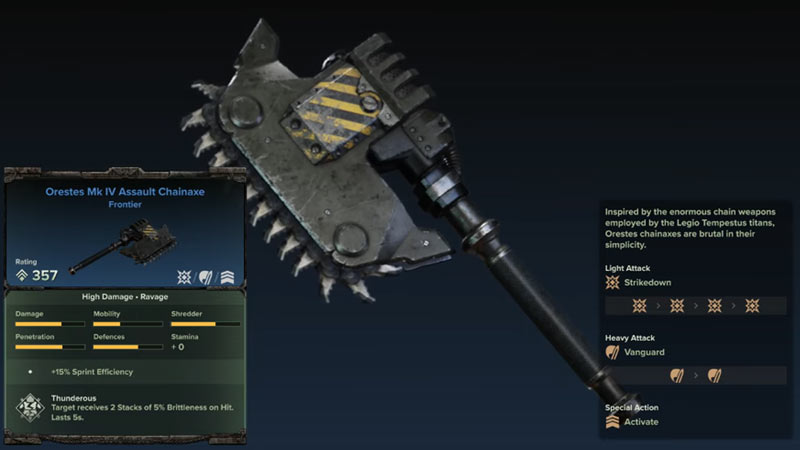
All weapons in the game have their own special action that can be used to deal some extra damage. To perform a special attack for the Chainsaw, players must press the Activate button. The default settings bind this command on M5 or mouse button 5. This is the additional button on the side of your mouse. If your current mouse doesn’t have any additional buttons, you can set the key bindings yourself. Go to the game’s options menu and click on the keybindings option. Look for the Special Attack under weapons and set the new button. Now when you press the key, you can finally rev your Chainsaw.
This special attack inflicts a lot more damage than base attacks. While using the Chainsaw in combat you can switch between light and special attacks. You can also use the special attack to perform a Revved Heavy Hit to ready tear through some hoards. There are three weapons that fall under the Chainsaw category. Orestes Mk IV Assault Chainaxe, Cadia Mk IV Assault Chainsword, and Tigrus Mk II Eviscerator. These can be used by only the Psyker, Zealot, and Veteran classes. However, the Tigrus is only for the Zealot class. Each has different stats and properties but all of them will rev their chains when you most need it.
That’s all we have on how to rev a chainsaw in Warhammer 40K Darktide. Check out our guide on How to complete Deadeye Penance for more on the game here at Gamer Tweak.