Dark and Darker is a Dungeon Crawl game that is made available to play since December 2022. Wherein, players can be involved in PvP, PvE, and Battle Royale game modes to redeem the fun. While battling the creatures from beneath the ground, make sure to look out for your teammates as well as yourself. As the monsters within the game are truly unforgiving. Most multiplayer games require players to connect to a specific region to get a better response. Since Dark and Darker is a new game, some players may find it difficult to select a region. Hence, here’s a guide that will show you the way to select a region. Make sure to read till the end as it also features an error stating ‘Server Region Unavailable.’
How to Select a Region in Dark and Darker
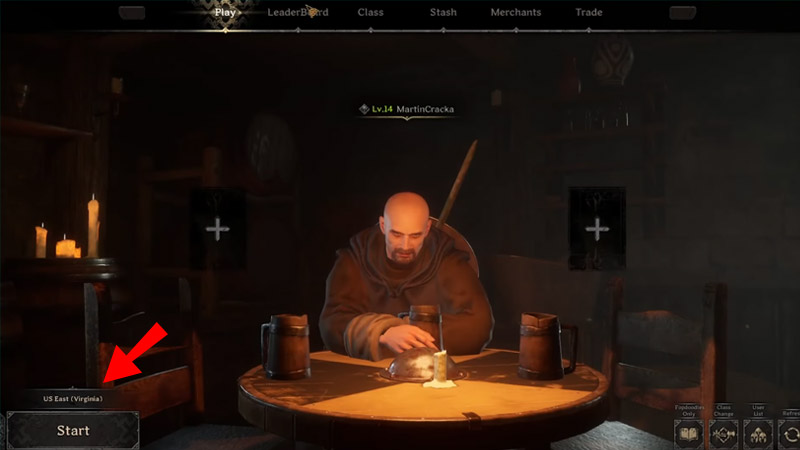
Here’s how you can select a region of your choice:
- Launch the game and enter the Main Menu Screen.
- Further, navigate and click on the Play tab.
- From there, click on the servers mentioned above the Dungeon Map option on the bottom left.
- You can now select your suitable region in Dark and Darker.
This Server Region is Currently Unavailable Error in Dark and Darker (Fix)
For players who were looking to enter the game with their squad, this error has been an absolute headache. Unfortunately, there is nothing you can do to get this issue fixed. However, make sure that you have a proper Internet Connection just to be sure. Also, you can try to reboot your system and internet router and try launching the game again. This workaround should mostly fix the ‘This Server Region is Currently Unavailable’ error in Dark and Darker.
For a safety check, you can also check Dark and Darker’s official Twitter account. Since the game is new and there are chances that devs may pull back the servers for temporary maintenance.
That’s everything covered on how to select the region and fix the unavailable region issue in Dark and Darker. Meanwhile, you are here, make sure to check out our other Gaming guides on Gamer Tweak.