Home > Gaming Guides > PoE Neversink Loot Filter 3.16 Download

PoE Neversink Loot Filter 3.16 Download And Installation Guide

Updated Date :

Path of Exile or PoE is an online RPG that is veyr popular. One of the things that players are searching for is the Neversink Loot Filter 3.16 download for Expedition and that’s exactly what we will give you in this guide. The Loot Filter is basically what you can use to filter bad loot which is something PoE players (especially beginners) want.

Path of Exile Expedition Neversink Loot Filter 3.16 Download Released

As posted by the NeverSinkDev on Reddit, NeverSink’s itemfiter has got the Expedition update. It improves the tiering algorithm and also gets the 3.16 update.

How to Download PoE Neversink loot filter 3.16
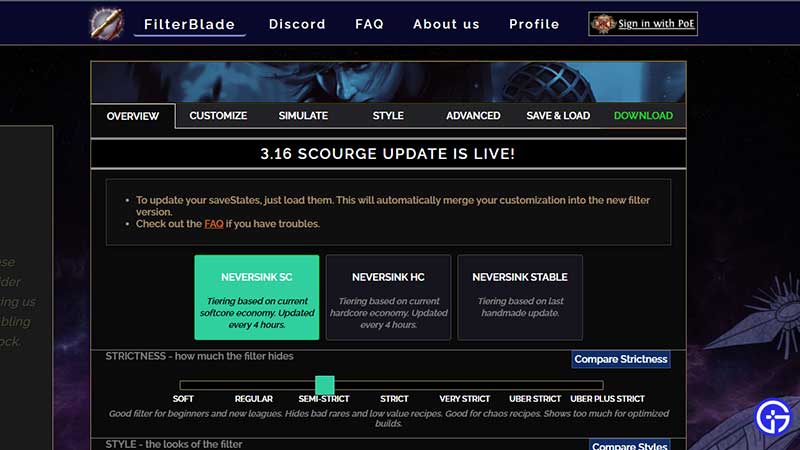
poe neversink download and installation guide

The developer recommends FilterBlade.xyz as the way to download the filter because it is always up to date. You don’t need any coding knowledge to modify and adjust as per your playstyle. It includes support for all styles, economy and strictness and also has explanations, overview and also a loot simulator. If you are a veteran player, then you can edit filters as well.

Apart from this, you can also download the filter from GitHub. To know more about the changelog and detailed information about this update, check out the reddit post here or the Github page has a lot of useful info as well.

How to Download & Install PoE Neversink loot filter 3.15

How to Install the Filter?

  • After downloading the latest available filter, extract the downloaded files using WinRar or WinZip.
  • Paste the .filter files into the folder: %userprofile%/Documents/My Games/Path of Exile
  • Now, when you are in-game, press Escape and select Options > UI and scroll down.
  • Choose the filters from the dropdown box and that’s it.

Note

  • The filter will not update automatically. You have to redownload the newest version to keep things updated,
  • There is a leveling mode and an endgame mode in this filter and the change will happen at itemlevel 65.

If you have any questions or suggestions, head over to their Discord server: discord.gg/mye6xhF

That’s all about PoE Neversink loot filter 3.16. Stay tuned for more guides on Gamer Tweak!

  • Beat the Anime Boss Codes (September 2026)

    Beat the Anime Boss Codes (September 2026)

    Published Date :

    Defeating an anime-inspired boss is only the beginning in Beat the Anime Boss. You can capture bosses, place them in your base to generate Cash, and let them battle other bosses while you keep upgrading damage, luck, and your team. Codes can give you powerful potions, artifacts, Cash, crystals, and even an exclusive unit. Here’s… Read More

  • Ukay Ukay Codes (September 2026)

    Ukay Ukay Codes (September 2026)

    Published Date :

    Running a secondhand clothing shop sounds simple until you have to uncover mystery bales, fill your racks, and stop customers from walking away with unpaid items. Ukay Ukay puts you in charge of a Filipino-inspired thrift store where you can buy clothing bales, open them for random stock, and turn your finds into profit. Codes… Read More

  • +1 Tongue Escape Codes (September 2026)

    +1 Tongue Escape Codes (September 2026)

    Published Date :

    Roblox is home to some of the strangest games and this one takes the cake. In +1 Tongue Escape, your tongue is the only tool you need to cross gaps and reach the end of each stage. You can stretch it toward platforms, create makeshift routes across obstacles, and increase your Tongue stat to handle… Read More

  • RE Heads Please Codes (September 2026)

    RE Heads Please Codes (September 2026)

    Published Date :

    In RE: Heads Please, you flip coins to earn money, roll better coins, unlock accessories, explore and more. Getting free rewards while you’re at it is always fun and codes provide plenty of them including Engraving Scrolls, Accessory tickets, Mining luck potions, Enchant Books, Sodas and more. This guide has the list of all the… Read More