Wondering how to play Slither.io with your friends? As you take on the role of a snake in this online multiplayer, your only goal is to consume as many multicolored orbs as you can and be the biggest slither of them all. Many players might wonder if there is any chance that they might play the game with their friends and compete with each other. However, the game doesn’t give you a direct multiplayer option to connect with other players. So if you are looking forward to inviting your friends to Slither.io but are wondering how to then check out this guide further to know more
How to Play with Friends in Slither.io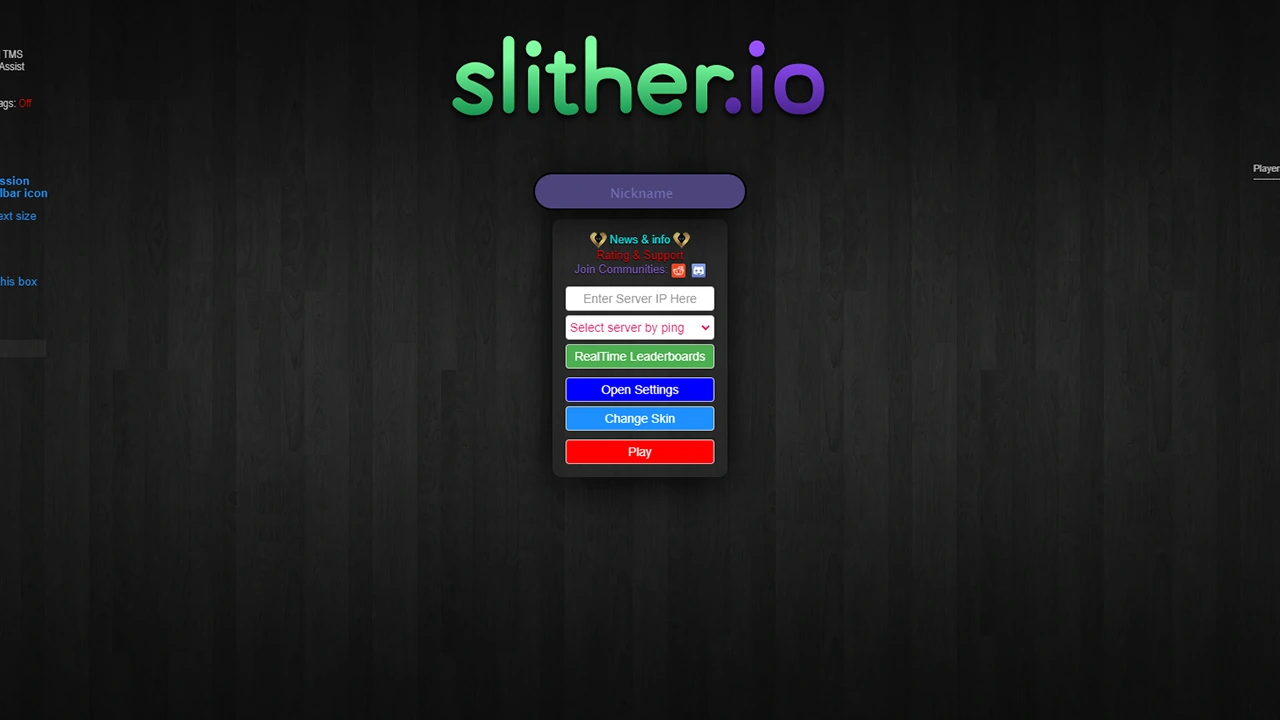
To play Slither.io with their friends, players and their friends will first have to download the NTL MOD Chrome extension on their PC devices. You can find it on the Chrome Web Store and simply add it to your list of extensions by clicking on Add to Chrome. It is worth mentioning that it will only allow you to play Slither.io with friends on the same server and not a dedicated one. With that in mind, here are steps you can follow once you have downloaded and installed the NTL MOD on your Chrome:
- Go to Slither.io to play the game.
- Once here, you will see all the changes done.
- After which select the Select Server By Ping option.
- Here, click on a server displayed in the list.
- Usually, the one with the lowest ping will give you the best FPS in-game.
- Once done, you will need to copy the IP address displayed on the bottom right.
- Send it to your friends who want to join in.
- After which they will have to paste the IP address on the text box above the Select Server Ping Option.
- Hit play and your friends will be able to join Slither.io with the same server.
It is worth keeping in mind, that the mobile version of Slither.io doesn’t have a multiplayer option that lets you play with your friends.
That’s everything covered on how to play Slither.io with friends. Check out the dedicated Video Game Guides section for more interesting guides like these, right here on Gamer Tweak.